
API Integration in Construction: A Plain-Language Guide
API integration in construction means your software tools automatically share project data with each other, so you stop re-entering the same numbers across five different platforms. When your scheduling app updates a task completion, your cost tracker knows. When a subcontractor submits an invoice in QuickBooks, your project management system reflects it. That automatic handoff is what API integration does. For project managers, the practical payoff is fewer manual entries, more reliable reports, and faster payment approvals. Industry bodies like buildingSMART International and open standards like IFC (Industry Foundation Classes) have pushed this kind of connected data environment to the center of modern construction practice.
Key Takeaways
API integration in construction means your project tools share data automatically, cutting manual entry and giving every role a reliable, real-time view of project status.
| Point | Details |
|---|---|
| What API integration means | Software tools exchange project data automatically, replacing manual re-entry across platforms. |
| Biggest operational benefit | Fewer duplicate entries, faster payment approvals, and reports teams can trust without manual correction. |
| Five project stages | Plan, map, build, test, and operate, with source-of-truth rules set before any development begins. |
| Open standards reduce cost | IFC-compatible workflows lower long-term integration cost and reduce vendor lock-in as you add tools. |
| Waiverpilotpro as a first target | Connects to Procore, QuickBooks, JobTread, and Buildertrend to auto-fill lien waivers from existing project data. |
Table of Contents
- Why API integration matters for construction workflows
- Common use cases where construction APIs do real work
- How does an API actually work in plain terms?
- Integration patterns and the five stages of an API project
- What to plan for: budget, timeline, security, and data ownership
- Which construction platforms have APIs, and how are they used?
- Your first 30–60 days: a practical API integration checklist
- The part of API integration that most guides skip
- How connected workflows change what project delivery actually feels like
- Waiverpilotpro: a ready-to-use integration for lien waivers
- Sources
Why API integration matters for construction workflows
Every role on a project feels data friction differently. API integration in construction addresses that friction at the source.
- Project managers get real-time schedule sync between field apps and office platforms, so the schedule you review on Monday morning reflects what actually happened on Friday afternoon.
- Estimators pull consistent scope and cost data from a single source instead of reconciling three spreadsheets before a bid.
- Field teams access up-to-date drawings, RFIs, and daily logs without waiting for someone in the office to email a file.
- Accounting teams receive cleaner invoices with matching cost codes, which cuts reconciliation time and reduces payment disputes.
The operational wins stack up quickly. APIs replace duplicate manual transfers between systems such as ERP and machine-management tools, saving time and reducing the kind of transcription errors that quietly inflate project costs. Better data flow also means better cash flow visibility. When your accounting system knows the moment a subcontractor completes a milestone, you can process payment faster and avoid the delays that stall construction payments across the industry.
The shift toward connected systems is accelerating. Open standards like IFC and USD are becoming central to construction’s data strategy because they reduce friction between tools and enable cross-platform collaboration without locking you into a single vendor’s ecosystem.
Common use cases where construction APIs do real work
Schedule synchronization
A field app like Procore or Autodesk Construction Cloud can push daily progress updates to a scheduling tool through an API. Instead of a scheduler manually adjusting dates after a site visit, the integration writes the update automatically.
Bid management and subcontractor prequalification
BuildingConnected and TradeTapp expose subcontractor data through their APIs. A GC’s procurement team can pull prequalification status, insurance certificates, and bid history directly into their project management platform without logging into a separate portal.
Purchase orders and materials tracking
When a purchase order is approved in your ERP, an API can push that data to your project management tool, updating committed costs in real time. No one has to manually enter the PO number twice.
Change orders and cost updates
Change orders approved in Procore or Buildertrend can trigger automatic cost-code updates in QuickBooks or Sage. The budget stays current without a manual export-import cycle.
Payroll and timecards
Field timecards collected in a construction management platform can flow directly to a payroll processor via API. Hours, cost codes, and job classifications transfer without re-keying, which matters when you’re managing crews across multiple active projects.
Lien waiver data flows
Lien waivers are one of the most repetitive data-entry tasks in construction finance. Every waiver requires the same project details: contract amount, payment amount, property address, and subcontractor name. When that data already lives in your project management or accounting system, API integration can populate the waiver automatically, cutting a 10-minute manual task down to seconds and reducing the transcription errors that create legal exposure.
Platforms like Waiverpilotpro connect directly to construction accounting workflows, pulling the project data needed to auto-fill waivers rather than requiring someone to type it in from scratch.
How does an API actually work in plain terms?
An API (Application Programming Interface) is a defined channel through which one software application requests data from another and receives a structured response. Think of it like a cashier at a restaurant: you tell the cashier what you want, the cashier relays the order to the kitchen, and the kitchen sends back exactly what you asked for. You never walk into the kitchen yourself. BuildingConnected’s support documentation uses this same analogy to explain how APIs act as intermediaries between applications.
Most construction platform APIs follow the REST (Representational State Transfer) standard. REST APIs use predictable web addresses (called endpoints) and standard HTTP methods:
- GET pulls data from the system (read-only, like fetching a list of subcontractors).
- POST creates new records (write, like submitting a new bid invitation).
- PUT updates existing records (write, like editing a cost code on an approved change order).
ConstructionOnline’s API follows exactly this RESTful pattern, using resource-oriented URLs and JSON-formatted responses, which is the standard you’ll find across most construction platforms.
Webhooks work differently. Instead of your system asking “any updates?” on a schedule, a webhook lets the source system push a notification the moment something changes. An invoice approved in QuickBooks can trigger a webhook that instantly notifies your project management platform.
Pro Tip: When you open a vendor’s API documentation for the first time, look for three things before anything else: the authentication method (usually OAuth 2.0 or an API key), the rate limits (how many requests per minute the API allows), and the list of available objects (subcontractors, invoices, change orders). Those three items tell you whether the integration you’re planning is technically feasible before you spend a dollar on development.
Integration patterns and the five stages of an API project
Four common patterns
Point-to-point connects two systems directly. Fast to build, low upfront cost, but it becomes a maintenance problem when either system updates its API or when you add a third tool that needs the same data.
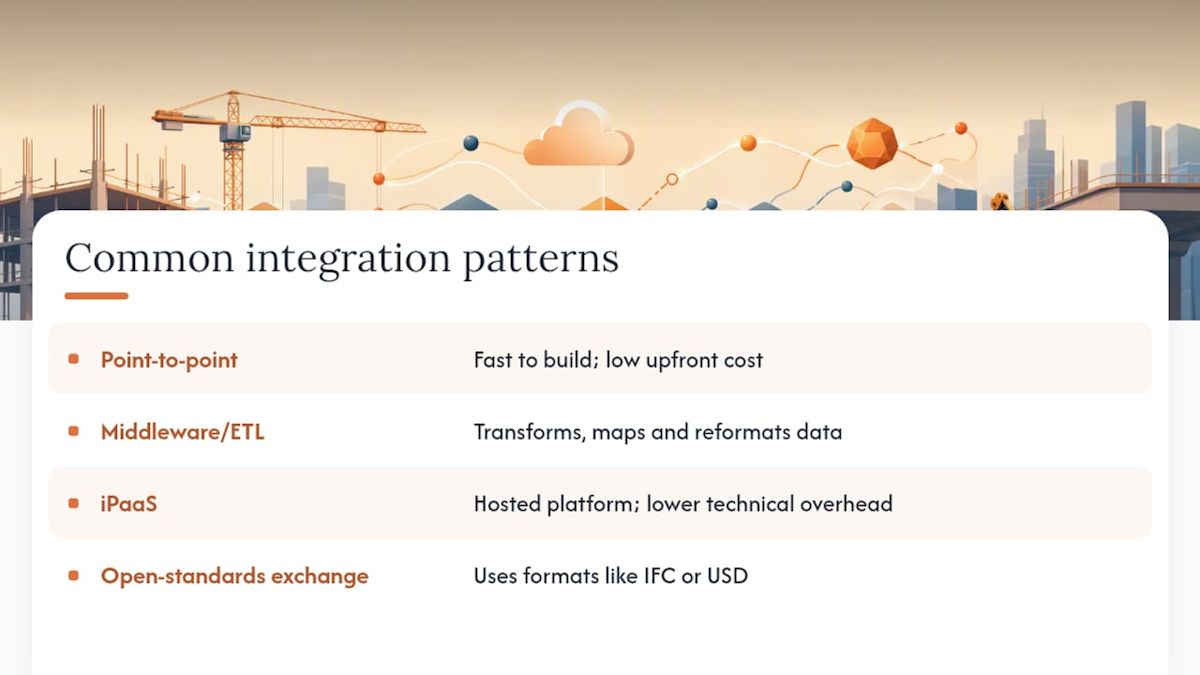
Middleware/ETL routes data through a transformation layer that cleans, maps, and reformats it before delivery. More reliable for complex data rules, but requires more setup time.
iPaaS (Integration Platform as a Service) uses a hosted platform like Zapier, Make, or a construction-specific connector to manage the connection. Lower technical overhead, faster deployment, and easier to maintain without a dedicated developer.
Open-standards exchange uses formats like IFC or USD to move data between tools that speak the same language natively. This approach reduces long-term cost and vendor lock-in, which is why industry publications increasingly advocate for open API standards.
The five stages of an API integration project
- Plan. Identify which systems need to share data, who owns each data object, and which system is the source of truth. A cost code that lives in both QuickBooks and Procore needs a declared owner before you build anything.
- Map. Document exactly which fields in System A correspond to which fields in System B. This is where most integrations slow down. Field names rarely match, and transformation rules (date formats, currency rounding, status codes) need explicit decisions.
- Build. Set up authentication, connect to endpoints, write the data-transfer logic, and handle batching for high-volume objects like timecards or bid invitations.
- Test. Run edge cases: what happens when a subcontractor name contains a special character? What if the source system sends a null value? Failure modes need to be tested before go-live, not discovered in production.
- Operate. Monitor the integration with alerts for failed syncs, review error logs regularly, and document everything. Practitioner guidance is clear that good integrations preserve workflow and require a defined source of truth per data object. Without documentation, an integration becomes a black box the moment the person who built it leaves the project.
What to plan for: budget, timeline, security, and data ownership
What actually drives cost
The complexity of your data rules drives cost more than the API itself. Conflict resolution logic (what happens when two systems update the same record simultaneously), approval workflows, and error-handling routines add development time. A simple read-only sync between two platforms with matching data structures can take days. A bidirectional sync with transformation rules, approval gates, and error recovery can take months.
Timeline ranges vary by pattern. A point-to-point connection between two well-documented APIs typically takes two to six weeks. An iPaaS-based connector can go live in days if a prebuilt template exists. A custom middleware solution with complex transformation rules often runs eight to sixteen weeks.
Security checklist
- Use OAuth 2.0 or token-based authentication rather than embedding credentials in code.
- Apply least-privilege access: the integration should only have permission to read or write the specific objects it needs.
- Rotate API tokens on a schedule and revoke them immediately when a vendor or contractor relationship ends.
- Log every API call with timestamps and response codes so you can audit data movement.
- US construction firms handling payment data should confirm that their integration approach aligns with their contractual data-handling obligations and any applicable state privacy requirements.
Data ownership and open standards
Every data object in your stack needs a declared source of truth before you build. Assigning a single source of truth per data object is the single most important governance decision in an integration project. Without it, you’ll spend more time resolving conflicts than the integration saves.
Open standards like IFC reduce long-term cost by letting tools exchange data in a common format rather than requiring custom translation layers for every new connection. As the industry moves toward open API standards, firms that adopt IFC-compatible workflows now will find it easier to plug in new tools later without rebuilding integrations from scratch.
One risk worth naming: if you outsource the build to a consultant, require full documentation and code ownership as a contract deliverable. Consultant turnover without documentation leaves integrations as costly, unmaintainable black boxes.
Which construction platforms have APIs, and how are they used?
- Procore offers a well-documented REST API through its developer portal with read/write access to projects, RFIs, submittals, change orders, and subcontractor lists. A common use case: pushing approved change orders to QuickBooks automatically.
- Autodesk Construction Cloud exposes project data, model files, and issue tracking through the Autodesk Platform Services (formerly Forge). Teams use it to sync BIM model data with scheduling and cost tools.
- BuildingConnected provides an API that exposes bid packages and subcontractor records. Its documentation notes that some endpoints are read/write while others are read-only, depending on the object type.
- TradeTapp (Autodesk’s prequalification tool) offers read-only access to subcontractor qualification data, useful for pulling risk scores into a GC’s procurement workflow.
- QuickBooks exposes invoices, vendors, cost codes, and payments through its REST API. The most common construction use case is syncing approved invoices from a project management platform to QuickBooks without manual re-entry.
- Buildertrend supports integrations with accounting and scheduling tools. Its API allows project data, schedules, and financial records to flow to connected systems. Waiverpilotpro’s Buildertrend integration lets contractors pull project data directly into lien waiver forms.
- JobTread provides API access to project financials and job data, making it a practical source-of-truth system for smaller GCs. Waiverpilotpro connects to JobTread to auto-populate waiver fields from job records.
- ConstructionOnline uses a RESTful API with standard HTTP methods and JSON responses, supporting project management objects including schedules, budgets, and documents.
- Waiverpilotpro integrates with Procore, QuickBooks, JobTread, Buildertrend, and Sage to pull project and payment data directly into lien waiver forms. The platform auto-calculates balances and supports multi-subcontractor workflows, making it a practical first integration target for any team that generates waivers regularly.
Your first 30–60 days: a practical API integration checklist
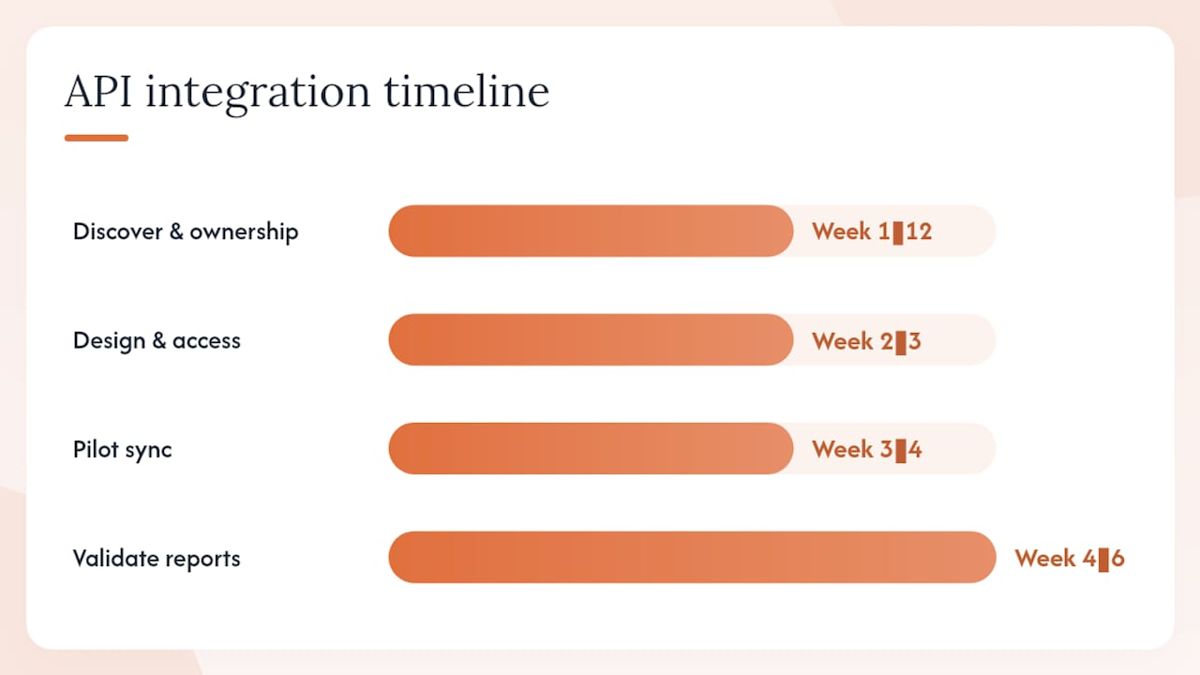
- Inventory your current systems (Week 1). List every platform your team uses and note what data each one holds. Owner: PM or operations lead.
- Pick your source of truth (Week 1–2). For each major data object (projects, cost codes, subcontractors, invoices), declare which system owns the master record. Owner: PM with input from accounting.
- Choose your integration pattern (Week 2). Decide between point-to-point, iPaaS, or custom middleware based on your technical resources and timeline. Owner: IT or a trusted vendor consultant.
- Secure credentials and access (Week 2–3). Request API keys or OAuth credentials from each vendor. Confirm rate limits and available objects. Owner: IT.
- Run a pilot sync on one data object (Week 3–4). Start with something low-risk and high-frequency, like pulling a subcontractor list or syncing project names. Validate the output against the source system manually. Owner: PM + developer.
- Validate reports and surface data issues (Week 4–6). Run your standard reports using integrated data and compare them to your previous manual process. Discrepancies here reveal mapping errors or transformation gaps before they affect live decisions. Owner: PM + accounting.
- Document and hand off (Week 6–8). Write down what each integration does, which credentials it uses, and who to contact if it breaks. Owner: IT or the consultant who built it.
Pro Tip: Run your pilot on a completed project rather than an active one. You already know what the correct data looks like, so any sync errors are immediately obvious and carry no live-project risk.
A second thing worth doing early: ask your vendor’s support team for a sandbox environment. Most major platforms including Procore and Autodesk Construction Cloud offer sandbox access so you can test API calls without touching production data.
The part of API integration that most guides skip
How connected workflows change what project delivery actually feels like
The conversation about API integration tends to focus on efficiency metrics, and those matter. But the more meaningful shift is what happens to decision-making when your data is reliable. When a project manager trusts that the schedule in the system reflects what’s actually happening on site, they stop spending the first 20 minutes of every meeting reconciling versions. When accounting knows that every approved invoice has already been matched to a cost code, payment processing moves faster and disputes drop.
The integrations that deliver the most value are rarely the most technically complex. A simple, well-maintained sync between your project management platform and your accounting system, with a clear source-of-truth rule and documented error handling, outperforms an elaborate multi-system integration that nobody fully understands. The teams I’ve seen get the most out of connected workflows are the ones who started small, validated one data flow completely, and then expanded. They also tracked a few concrete measures: manual entries per week before and after, time-to-close on invoices, and how often reports needed manual correction. Those numbers tell you whether the integration is working, and they make the business case for the next one.
Waiverpilotpro: a ready-to-use integration for lien waivers
Lien waivers are a natural first integration target because the data already exists in your project management and accounting systems. Waiverpilotpro connects to Procore, QuickBooks, JobTread, Buildertrend, and Sage to pull that data directly into waiver forms, so you’re not typing the same contract amount and property address for the fifteenth time this month.
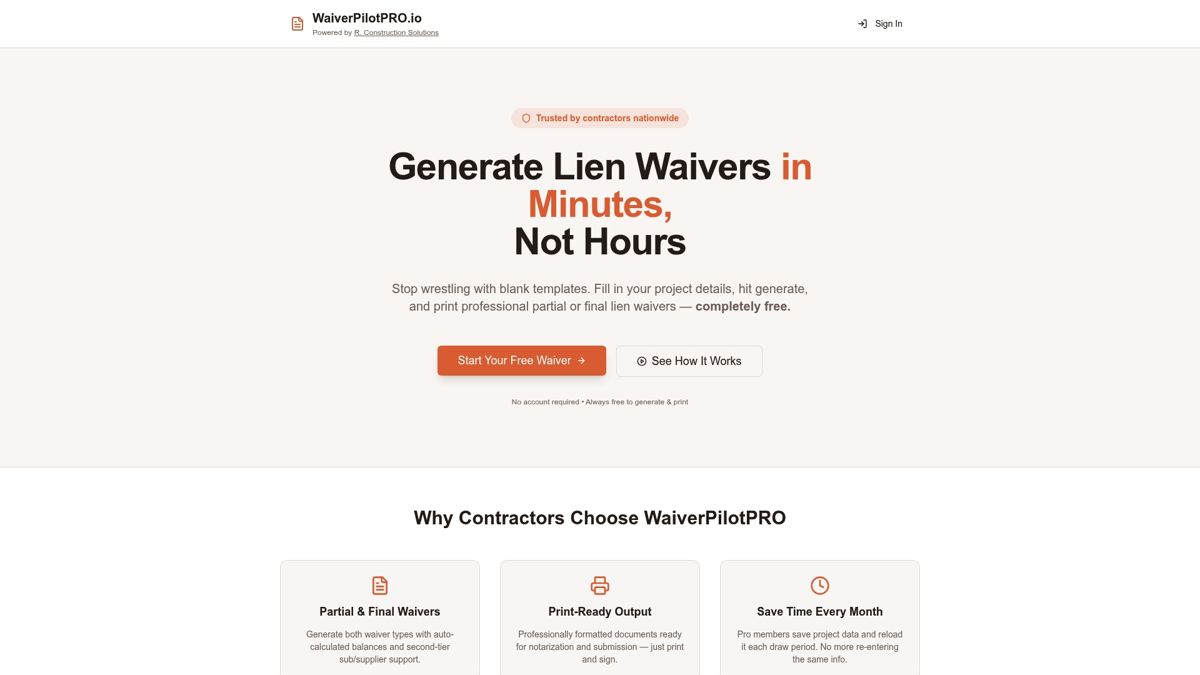
The free lien waiver generator handles conditional and final waivers with auto-calculated balances and multi-subcontractor support. No account creation required to generate your first waiver. The Pro tier adds AI-powered contract auto-fill, project saving, and bulk generation for teams managing high waiver volumes. If you’re building out your integration stack and want a quick win that immediately reduces admin overhead, lien waiver automation is a practical place to start.
Sources
- Data Interoperability: The Key to Connected, Collaborative and Profitable Construction - Construction Executive
- What is an application programming interface (API)? – BuildingConnected (us)
- Construction Software Integrations | Ekyon
- What are interfaces? APIs in construction explained simply | syniotec