
Schedule of Values Construction Example: G703 Guide
A schedule of values (SOV) is the line-item allocation of your total contract sum, and it becomes the billing backbone for every progress payment on the job. Your immediate next step: prepare a G703-formatted continuation sheet tied directly to your approved estimate and submit it to the architect before you file your first Application for Payment. Under AIA A201 §9.2, that submission is a contractual precondition, not a courtesy, and the accepted SOV becomes the measuring stick for every pay application that follows.
Key Takeaways
A schedule of values must equal the contract sum to the penny and be submitted before the first pay application under AIA A201 §9.2, making early preparation the single most important step in protecting your cash flow.
| Point | Details |
|---|---|
| Submit before the first pay app | AIA A201 §9.2 requires SOV acceptance before you can file Application No. 1. |
| Column C must match the contract sum | Every line value in Column C must total the contract price exactly; a penny off causes rejection. |
| Use G703 columns A–I correctly | Percent complete = Column G ÷ Column C; stored materials in Column F need supplier invoice backup. |
| Avoid front-loading | Distribute overhead and profit across trade lines so percent complete reflects real field progress. |
| Waiverpilotpro reduces month-end admin | After G702 certification, use Waiverpilotpro to generate lien waivers with auto-calculated balances and Procore/QuickBooks integration. |
Table of Contents
- What a schedule of values is and why it controls your cash flow
- How the G703 and G702 work together in the payment workflow
- How to build your SOV from the estimate, step by step
- What goes on the G703: a column-by-column breakdown
- A filled G703-style example with worked math
- Common SOV mistakes that delay your payment
- Your pre-submission workflow and timeline
- What actually prevents recurring SOV problems
- Waiverpilotpro cuts the admin that follows a certified pay app
- Sources
What a schedule of values is and why it controls your cash flow
A schedule of values is a table that breaks your contract sum into individual line items, each assigned a dollar value. Together, those values must add up to the total contract price, to the penny. Every month, you report how much of each line is complete, and the owner pays based on that progress.
The SOV matters for practical reasons:
- It ties your estimate to your billing. Without it, there is no agreed basis for measuring progress, and disputes over payment amounts become almost inevitable.
- It drives retainage and change order tracking. Retainage is calculated line by line from the SOV. Change orders add new lines or adjust existing ones.
- It is contractually required. On private commercial jobs, AIA A201 §9.2 requires submission before the first pay app. On federal projects, FAR clause 552.236-15 requires a cost breakdown with enough detail for the contracting officer to evaluate each payment application.
Most owners and architects prefer overhead and profit distributed across trade lines rather than pulled into a single early-billing line. That distribution ties percent complete to real field progress, which makes the SOV far easier to defend during review.
How the G703 and G702 work together in the payment workflow
The G703 (Continuation Sheet) and G702 (Application and Certificate for Payment) are designed as a matched pair. The G703 carries all the line-level detail; the G702 summarizes it on a single cover page that the architect signs to certify payment.
The sequence runs like this:
- You prepare the SOV on the G703 before the first pay app and get it accepted.
- Each billing period, you update the G703 columns to reflect work completed and materials stored.
- The G702 pulls the totals from the G703 and shows the net amount due after retainage.
- The architect reviews both documents, certifies the G702, and the owner releases payment.
The review window on most commercial projects runs roughly two to three weeks from submission. The most common reasons a pay package comes back: rounding errors that cause Column C to miss the contract sum by even a few cents, totals on the G702 that don’t match the G703 line-level math, and change orders that appear in the field but haven’t been added to the SOV yet. Catching those issues before you submit is far less painful than waiting an extra billing cycle for your money.
How to build your SOV from the estimate, step by step
Starting from a project summary or a rough bid is the single biggest mistake contractors make. Your SOV needs to come from the approved estimate and your work breakdown structure (WBS), not a high-level number.
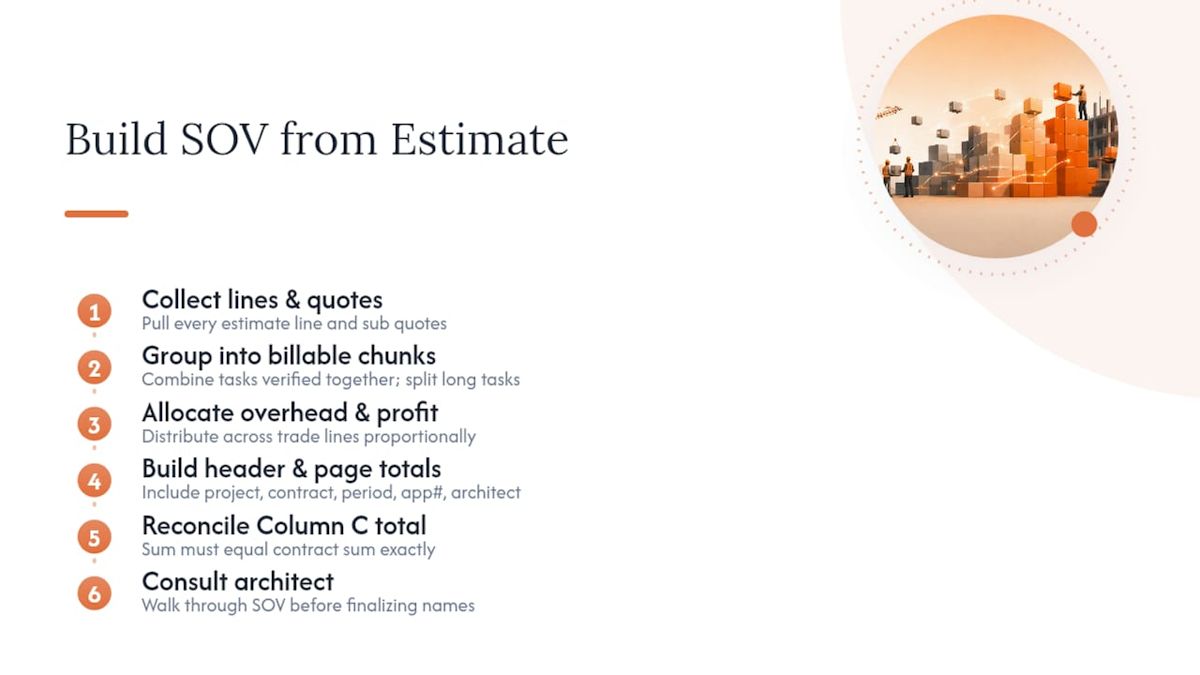
1. Collect your estimate lines and subcontractor quotes. Pull every line from the estimate. Gather signed or near-final sub quotes so you know the actual buyout cost for each trade. This is the raw material for your SOV.
2. Group items into measurable, billable chunks. Each SOV line needs to be something you can independently verify in the field. If two estimate tasks always finish at the same time (say, rough framing and temporary bracing), combine them into one line. If a task spans months and has clear milestones, keep it separate so you can bill incrementally.
3. Allocate overhead and profit. Distribute general conditions, overhead, and profit across trade lines proportionally rather than front-loading them into mobilization. This keeps your SOV defensible and avoids the front-loading red flag that architects watch for.
4. Build the header and page totals. Fill in project name, contract number, application number, billing period, and architect contact. These fields seem minor, but a missing application number or wrong period date is a common cause of immediate rejection.
5. Run your reconciliation check. Add up every value in Column C. That sum must equal the contract sum exactly. A difference of even $0.01 will typically cause a rejection. Per G703 instructions, this is a hard requirement, not a suggestion.
Pro Tip: *Before you finalize line names and measurement methods, walk through the SOV structure with the architect or owner’s representative.
A practical example of collapsing estimate lines: if your estimate has three separate tasks for site clearing, grubbing, and topsoil stripping, but all three happen in the same week and are measured together by the inspector, combine them into one SOV line called “Site Clearing and Grading.” You bill it as a single unit, which is simpler to verify and less likely to generate questions.
What goes on the G703: a column-by-column breakdown
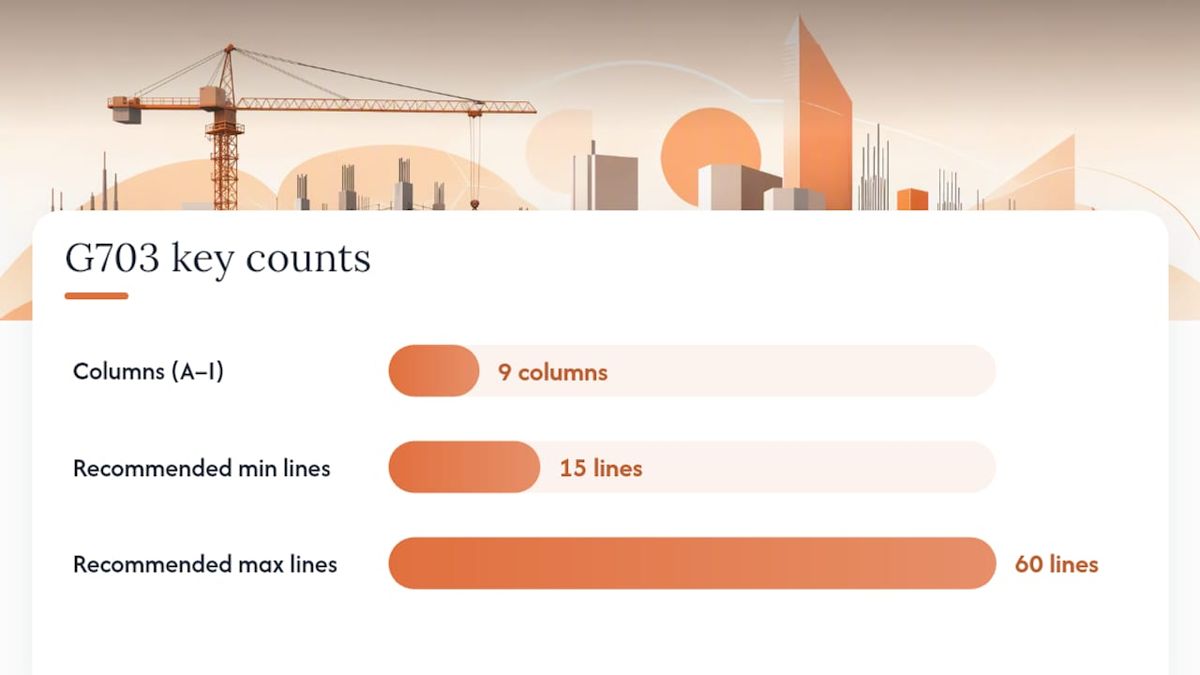
The G703 uses nine columns, labeled A through I, each serving a specific purpose in the pay-app math. Here is what each column contains and how the values flow:
| Column | Label | What to enter |
|---|---|---|
| A | Item No. | Sequential line number (1, 2, 3…) |
| B | Description of Work | Short, clear name for the scope item |
| C | Scheduled Value | Dollar value allocated to this line; all Column C values must sum to the contract total |
| D | Work Completed — Previous Applications | Cumulative amount billed through the last pay app |
| E | Work Completed — This Period | Dollar value of work completed in the current billing period |
| F | Materials Presently Stored | Value of materials on-site or in bonded storage, not yet installed |
| G | Total Completed and Stored to Date | D + E + F |
| H | % (G ÷ C) | Percent complete for this line item |
| I | Balance to Finish | C minus G |
Retainage is typically tracked in a separate column or noted on the G702 cover. The rate varies depending on contract and applicable state law; verify your specific retainage percentage in your contract and local regulations.
For Column F (stored materials), the item must be suitably stored, insured, and documented. On public projects, the California DOT sample SOV illustrates the level of backup expected: supplier invoices, a materials-in-storage ledger, and proof of insurance. Once materials are installed, their value moves from Column F to Column E in the next billing period.
Common line-item categories aligned with MasterFormat divisions:
- Mobilization and general conditions (Division 01)
- Sitework and earthwork (Division 31)
- Concrete (Division 03)
- Masonry (Division 04)
- Structural steel and framing (Division 05)
- Mechanical, electrical, and plumbing (Divisions 22, 23, 26)
- Finishes: drywall, flooring, painting (Divisions 09)
- Specialties and equipment (Divisions 10–14)
- Contingency (shown as a separate line when applicable)
Aim for 15–60 lines on a commercial job. Too few lines and the architect can’t verify progress; too many and the pay application becomes an administrative burden for everyone.
A filled G703-style example with worked math
The table below shows a simplified five-line SOV for a small commercial tenant improvement. The math for Line 3 is worked out in full so you can see how the columns connect. For a full public-project format, the California DOT sample SOV is a downloadable, accepted example you can reference directly.
Line 3 math worked out:
- Column G = D ($0) + E ($15,000) + F ($5,000) = $20,000
- Column H = G ($20,000) ÷ C ($25,000) = 80%
- Column I = C ($25,000) − G ($20,000) = $5,000
This is how G703 line-level numbers roll up into the G702 summary: the G702 picks up the Column G total ($63,000), subtracts retainage (say, 10% = $6,300), and shows a net certified amount of $56,700 for this application. The prior certified amount ($21,000 minus prior retainage) is subtracted to arrive at the current payment due.
For a blank G703-style spreadsheet you can copy and adapt, visit the free construction forms library at Waiverpilotpro. Most project management platforms, including Procore, accept a G703-formatted upload directly into the pay-application module.
Common SOV mistakes that delay your payment
Architects and owners’ representatives see the same errors repeatedly. Knowing what they look for lets you fix problems before the package leaves your desk.
- Front-loading. Assigning inflated values to early-phase lines (mobilization, sitework) so you bill more in the first few months. Architects recognize this pattern immediately and will ask you to rebalance. The fix: distribute overhead and profit proportionally across all trade lines.
- Column C doesn’t equal the contract sum. Even a $0.01 rounding difference causes a rejection. Always reconcile to the penny before submitting.
- G702 totals don’t match G703 math. If you manually enter totals on the G702 cover rather than pulling them from the G703, transcription errors are common. Pull the numbers directly.
- Missing or unapproved change orders. If a change order has been executed in the field but not formally added to the SOV, the architect will reject the line or the entire application. Add approved change orders as new lines before submitting.
- Vague line descriptions. “Miscellaneous work” or “Phase 1” gives the reviewer nothing to verify. Use specific scope descriptions tied to MasterFormat divisions.
- Wrong application number or billing period. A skipped application number or a period that overlaps with the previous submission triggers an immediate return.
- Stored materials without backup. Claiming Column F without attached supplier invoices and a storage ledger is a common rejection cause on public projects.
Pro Tip: Run a three-point QA check before every submission: (1) confirm Column C sums to the contract total, (2) verify the G702 cover totals match the G703 line math, and (3) check that the application number, period dates, and architect name are correct. Two minutes of checking saves two weeks of waiting.
Your pre-submission workflow and timeline
A consistent month-end routine is what separates contractors who get paid on time from those who spend weeks chasing certifications.
Suggested internal timeline:
- Day 1–3 of the billing period close: Field superintendent confirms quantities complete for each SOV line. No estimates, no guesses.
- Day 3–5: Project manager updates the G703, adds any approved change orders, and runs the three-point QA check.
- Day 5–6: Project accountant verifies that Column C still equals the contract sum (especially after change orders) and confirms stored-materials documentation is attached.
- Day 6–7: Draft sent to the architect’s office before the formal submission deadline. An informal preview gives the reviewer a chance to flag issues before the clock starts on the official review window.
Who to loop in: your PM, the project accountant, the lead field superintendent, and, where the contract requires it, the architect’s project manager for a pre-submission conversation.
What to attach: backup estimate excerpts for new change-order lines, supplier invoices and a storage ledger for any Column F claims, and signed subcontract agreements where the owner has requested them.
File naming: use a consistent convention like ProjectName_PayApp_No03_2026-05.pdf so the architect’s team can file and retrieve documents without confusion.
Pro Tip: For subcontractor cash flow, align your sub pay-app deadlines two to three days before your own submission deadline. That way, sub billings feed directly into your G703 update without a last-minute scramble.
What actually prevents recurring SOV problems
Most SOV disputes aren’t caused by bad math. They come from habits formed early in the job that nobody corrects until a payment is held.
The single most effective habit is keeping your SOV tied to the buyout as subcontracts are signed. When a sub signs at a number different from your original estimate, update the SOV line immediately. Don’t wait for a change order to formalize it. A SOV that drifts from the buyout becomes a billing document that no longer reflects reality, and architects notice.
The second habit is the two-minute math-and-header check before every submission. Not a full audit, just a penny-check on Column C, a signature confirmation, and a period-covered verification. It sounds trivial, but it catches the errors that cause the most delays.
One caution that contractors often overlook: SOV acceptance is a contractual event, not an informal agreement. Under AIA A201 §9.2, the architect’s acceptance of your SOV is the formal step that authorizes future billing against those line values. Get that acceptance in writing, or confirm an explicit review window in your pre-construction meeting. An SOV you submitted but never received written acceptance on is a SOV that can be challenged at any point in the project.
Waiverpilotpro cuts the admin that follows a certified pay app
Once your G702/G703 is certified, the next task is generating lien waivers for every subcontractor and supplier who received payment. That step is where a lot of month-end time disappears.

Waiverpilotpro gives you a faster path. The free lien waiver generator produces conditional and unconditional waivers in PDF or Word format, with auto-calculated payment balances, so you’re not manually entering figures from the G702 into separate waiver documents. The platform connects directly with Procore and QuickBooks, which means your certified pay-app data flows into the waiver workflow without re-keying. For teams managing multiple subcontractors, the multi-sub support handles the whole roster in one session. Start with the G702/G703 pay app guide to see how the full payment package fits together, then generate your first waiver free.
Sources
These are the primary references and downloads you should have open when preparing or reviewing an SOV.
- Instructions: G703®–1992, Continuation Sheet
- How to Fill Out and Submit the AIA G703 Continuation Sheet - LegalClarity
- Sample Schedule of Values for a Building Project (California DOT)
- Schedule of Values in Construction: A Pay-Application Playbook | Corpay
Save copies of your SOV keyed to the project name and application number (for example, Riverside_Office_SOV_v3.xlsx). Attach backup estimate excerpts to the first submission so the architect can trace each line back to the bid. When your contract specifies ConsensusDocs 293 or an owner-specific format instead of G703, use that form, but the column logic and reconciliation rules remain the same.