
GC Closeout Documentation Explained: A Clear Checklist
GC closeout documentation is the owner-facing package of record drawings, O&M manuals, warranties, certificates, lien waivers, and final pay paperwork that a general contractor assembles to formally turn a project over and trigger final payment. Think of it as the last deliverable on the job, and the one that determines whether your retainage gets released on time or sits in limbo for months. Closeout documents give owners everything they need to manage and maintain their building from day one of occupancy, which is why owners and their reps treat an incomplete package as a reason to withhold payment.
The essential items every owner expects at turnover:
- Record (as-built) drawings, signed or stamped by the A/E
- Operations and maintenance (O&M) manuals for all installed systems
- Warranties from the GC, subcontractors, and manufacturers
- Certificate of Substantial Completion (AIA G704)
- Certificate of Occupancy (CO) or equivalent AHJ sign-off
- Punch list closure confirmation
- Commissioning and startup reports
- Test and inspection records
- Lien waivers and releases from the GC and all subs/suppliers
- Final pay application (AIA G702/G703 or contract equivalent)
- Attic stock, keys, access cards, and training records
Deliver the CO, G704, and conditional lien waivers first. Those three items unlock the owner’s ability to occupy the space and authorize final payment, so any delay on them holds everything else up.
Key Takeaways
GC closeout documentation requires assembling record drawings, O&M manuals, warranties, certificates, lien waivers, and a final pay application into a complete, indexed package before the owner will release retainage.
| Point | Details |
|---|---|
| Start closeout at kickoff | Build your closeout register from Division 01 on day one and assign an owner to every deliverable. |
| Collect documents progressively | Require subs to submit O&M manuals, warranties, and test reports as systems are installed, not at turnover. |
| Sequence lien waivers correctly | Use conditional waivers during the project; exchange for unconditional finals only after payment is confirmed. |
| Deliver a structured digital package | Organize files by category with consistent naming so the owner’s facility team can use the package immediately. |
| Waiverpilotpro simplifies waiver generation | Generate state-specific conditional and unconditional waivers free, with Procore, QuickBooks, and Buildertrend integrations. |
Table of Contents
- What GC project closeout is and why it matters to your bottom line
- Who is responsible for each closeout deliverable
- How the closeout process works, step by step
- Your working closeout document checklist
- How lien waivers and final payment work together
- How to assemble and deliver the turnover package
- Mistakes that delay acceptance or payment
- When to start closeout activities and a sample milestone timeline
- Key standards and contract references to know
- Practical tools and templates for your closeout workflow
- The closeout habit that changes everything
- Waiverpilotpro removes the lien waiver bottleneck at closeout
- Sources
What GC project closeout is and why it matters to your bottom line
Closeout is not a single event. It is a defined phase of the project that begins at substantial completion and ends at final completion, and the distinction between those two milestones carries real financial weight.
Substantial completion is the point at which the work is sufficiently complete that the owner can use or occupy the facility for its intended purpose. The AIA G704 Certificate of Substantial Completion formally documents this milestone, establishes the warranty start date, and identifies any remaining punch list items. Final completion comes later, once every punch list item is resolved, all closeout submittals are accepted, and the final pay application is approved.
Why does this matter to you as a GC? Several concrete reasons:
- Retainage release is typically tied to final completion. Until the owner accepts the closeout package, that retained percentage stays off your books.
- Warranty clocks start at substantial completion. A delayed or disputed SC date can shift warranty exposure in ways that cost you money.
- Risk transfers to the owner at substantial completion for most AIA contracts, but only when the G704 is properly executed.
- Owner operations depend on your O&M manuals and training records. A facility manager who cannot operate the HVAC system on day one will come back to you, not the equipment manufacturer.
The contract and the AHJ both trigger closeout activities. Common triggers include:
- The GC’s written notice to the A/E requesting a substantial completion inspection
- The AHJ’s final inspection and issuance of the CO
- Division 01 Section 01 77 00 submittal requirements (pre-inspection submittals, final completion submittals)
- Lender draw requirements tied to completion milestones
Who is responsible for each closeout deliverable
Closeout fails when everyone assumes someone else is handling a document. The table below maps the most common deliverables to the party responsible for producing them and the party responsible for accepting or approving them.
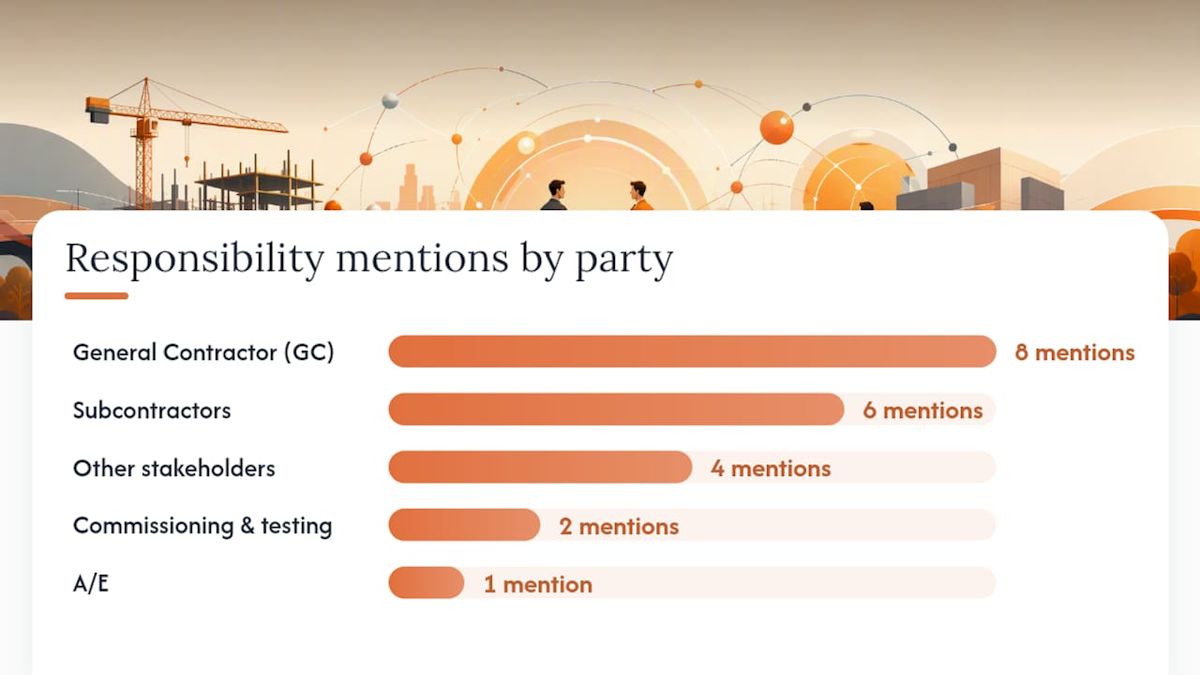
| Deliverable | Responsible Party | Accepts / Approves | Typical Timing |
|---|---|---|---|
| Record (as-built) drawings | GC coordinates; subs mark up | A/E signs off | Submitted at substantial completion |
| O&M manuals | Subcontractors produce; GC compiles | Owner / facility manager | 10–15 days before SC per most specs |
| Warranties (equipment, systems, workmanship) | Subs and manufacturers; GC aggregates | Owner | At or before substantial completion |
| AIA G704 (Certificate of Substantial Completion) | A/E prepares; GC and owner sign | Owner and A/E | At substantial completion inspection |
| Certificate of Occupancy | GC coordinates AHJ inspections | AHJ issues; owner receives | Before or at substantial completion |
| Commissioning and startup reports | Commissioning agent or sub | A/E and owner | Before SC; some within 10 days after |
| Test and inspection records | Testing sub or GC | A/E reviews | Concurrent with work; compiled at SC |
| Punch list | GC prepares; subs execute | A/E and owner verify | Issued at SC; resolved before final |
| Lien waivers and releases | GC and all subs/suppliers | Owner / title company | Progressive; final at payment release |
| Final pay application (AIA G702/G703) | GC prepares | A/E certifies; owner approves | After punch list resolved and package accepted |
| Training records | Subs conduct; GC documents | Owner | Before or at substantial completion |
| Attic stock, keys, access cards | GC delivers | Owner acknowledges receipt | At substantial completion |
Institutional closeout procedures typically require O&M manuals and commissioning reports to be submitted 10 days before the GC requests a substantial completion inspection. Missing that window often delays the inspection itself, which pushes every downstream milestone.
Practical control points to build into your process:
- Use a transmittal log for every submittal so you have proof of delivery and date.
- Require certified delivery (email with read receipt, or a signed transmittal form) for warranties and O&M manuals.
- Get the A/E’s written sign-off on as-built drawings before you submit the final pay app.
- Confirm with the AHJ at least 30 days before anticipated SC that all inspections are scheduled.
How the closeout process works, step by step
A staged closeout workflow reduces delays at turnover and keeps the final push from becoming a scramble. The key is treating closeout as a live process that runs alongside construction, not a sprint that starts when the last nail is driven.
Step 1: Build your closeout requirements register at project kickoff
Pull every closeout deliverable from Division 01 (Sections 01 77 00, 01 78 00, 01 79 00), the owner’s project requirements, and the AHJ’s checklist. Assign an owner and a due date to each item. A requirements-driven closeout register that maps each item to an owner reduces missing deliverables and speeds retainage release.
Step 2: Collect documents progressively during construction
Do not wait until the end. Require subs to submit warranties, O&M manuals, and test reports as systems are installed and commissioned. A sub who finishes mechanical work in month four should hand over the HVAC O&M manual in month four, not month fourteen.
Step 3: Run a pre-closeout gap review 30 days before anticipated SC
Pull your closeout register and identify every open item. Send written notices to subs with outstanding deliverables. Northwestern’s closeout procedures require pre-inspection submittals a minimum number of days before the GC requests substantial completion, so confirm your contract’s specific window and work backward from there.
Step 4: Request the substantial completion inspection
Submit written notice to the A/E that the work is substantially complete. Include your pre-inspection submittals per the contract. The A/E will conduct the inspection and issue the punch list.
Step 5: Execute the punch list
Assign punch list items to the responsible subs immediately. Track completion in writing. The A/E or owner’s rep will verify resolution before issuing the G704.
Step 6: Complete commissioning, testing, and owner training
Confirm all systems are commissioned, all test reports are signed, and all owner training sessions are documented. These records must be in the turnover package before the owner will accept it.

Step 7: Assemble and deliver the turnover package
Compile every item from your closeout register into a structured package (see the checklist and delivery sections below). Deliver with a formal transmittal letter listing every item included.
Step 8: Submit the final pay application and collect final releases
Once the owner accepts the package and the punch list is resolved, submit your AIA G702/G703 final pay application. Collect unconditional final lien waivers from all subs and suppliers after confirming payment is received.
Pro Tip: Start a shared closeout folder in your project management platform on day one of the job. Label it “Closeout” and drop every warranty, test report, and O&M manual into it as it arrives. When turnover comes, you are organizing, not hunting.
Your working closeout document checklist
Closeout submittals verify that installed equipment and systems match the approved specifications, and structured digital delivery is now the standard expectation on most commercial projects. The list below covers what owners and AHJs typically require.
Required documents
| Document | Format | Submission Timing |
|---|---|---|
| Record (as-built) drawings | PDF + native CAD/BIM files | At substantial completion |
| O&M manuals (indexed by system) | PDF, searchable; hard copy if required | 10 days before SC inspection |
| Equipment warranties | PDF, signed originals | At substantial completion |
| Subcontractor and GC workmanship warranties | PDF, signed | At substantial completion |
| AIA G704 (Certificate of Substantial Completion) | Executed original | At substantial completion |
| Certificate of Occupancy / AHJ final sign-off | PDF of original | Before or at substantial completion |
| Commissioning and startup reports | Before SC; some within 10 days after | |
| Test and inspection records | Compiled at substantial completion | |
| Punch list (issued and resolved) | PDF or platform export | Issued at SC; resolved before final |
| Attic stock inventory | PDF list with quantities | At substantial completion |
| Keys, access cards, remote controls | Physical delivery with receipt | At substantial completion |
| Owner training records | PDF sign-in sheets | Before or at substantial completion |
| Photos (progress and final) | JPEG/PDF, labeled by location | At substantial completion |
| Permits (building, electrical, mechanical, plumbing) | PDF copies | At substantial completion |
| Lien waivers and releases | PDF, notarized where required | Progressive; final at payment |
| Final pay application (AIA G702/G703) | PDF + executed original | After package acceptance |
University closeout checklists typically require both hard-copy and electronic submissions, with specific copy counts for the owner, A/E, and GC archive. Confirm your contract’s requirements before you print anything.
Sample transmittal cover items
Use these bullets as the line-item list on your transmittal letter:
- Project name, address, contract number, and date of transmittal
- List of every enclosed document with document number, revision, and date
- Submission type (for review, for record, for approval)
- Recipient name, company, and delivery method
- GC’s authorized signature and contact information
- Reference to the contract section requiring the submittal (e.g., “Per Section 01 77 00”)
AIA forms G702 (Application and Certificate for Payment) and G703 (Schedule of Values and Continuation Sheet) are the standard vehicles for the final pay application. AIA G704 is the standard Certificate of Substantial Completion. Reference these form numbers in your transmittal so the owner’s team can match them to their contract requirements.
How lien waivers and final payment work together
A lien waiver is a written document in which a contractor, subcontractor, or supplier gives up their right to file a mechanics lien against the property in exchange for payment. Think of it as a receipt that also surrenders a powerful legal remedy. Get the type wrong or sign at the wrong time, and you either expose the owner to a lien claim or give up your own leverage before the check clears.
Lien waivers are financial risk-mitigation tools, and collecting conditional and unconditional waivers progressively is recognized best practice to avoid unexpected lien claims at final payment.
The four waiver types you need to know
- Conditional progress waiver: Waives lien rights for work completed through a specific date, but only once payment for that period is actually received. Safe to sign before the check clears.
- Unconditional progress waiver: Waives lien rights for work through a specific date with no payment condition. Sign only after you have confirmed funds are in your account.
- Conditional final waiver: Waives all remaining lien rights, conditioned on receipt of the final payment amount stated. Safe to sign and submit with your final pay app.
- Unconditional final waiver: Waives all lien rights permanently with no conditions. Sign only after the final payment has cleared, not before.
For a deeper look at how these types differ legally and practically, the conditional vs. unconditional lien waiver guide on Waiverpilotpro walks through the sequencing in plain language.
Best-practice controls for waiver collection
- Collect a conditional progress waiver from every sub and supplier with each monthly pay application.
- Never release payment to a sub without a signed waiver for the prior period.
- Require subs to collect waivers from their own lower-tier subs and suppliers before you pay them.
- At final payment, collect conditional final waivers from all parties when you submit your final pay app, then exchange them for unconditional final waivers once funds are confirmed.
- Keep a waiver log that tracks every party, every payment period, and every waiver status.
Lien waiver timing is where GCs most often lose leverage. A conditional waiver protects you during the payment process; an unconditional waiver ends your protection permanently. Never sign an unconditional final waiver until you have confirmed the funds have cleared your account.
Pro Tip: Lien waiver rules vary by state, including required language, notarization, and deadlines. Before you use a generic template, check your state’s specific requirements. Waiverpilotpro offers state-specific lien waiver templates that reflect current statutory language so you are not relying on a form that may not hold up in your jurisdiction.
How to assemble and deliver the turnover package
The format of your turnover package matters almost as much as its contents. An owner’s facility team that cannot find the HVAC O&M manual in a disorganized folder will treat the package as incomplete, even if the document is technically there.
Recommended folder structure
Organize your digital package with a top-level folder named for the project, then subfolders by category:
01_Record-Drawings(PDF and native CAD/BIM files, named by sheet number and revision)02_OM-Manuals(one subfolder per system: HVAC, electrical, plumbing, fire protection, etc.)03_Warranties(one PDF per warranty, named by trade and equipment)04_Certificates(CO, G704, inspection certificates, commissioning reports)05_Test-Inspection-Records(named by system and test date)06_Lien-Waivers(organized by payment period and party)07_Pay-Applications(G702/G703 for each draw, final pay app last)08_Training-Records(sign-in sheets, training agendas)09_Photos(labeled by location and date)10_Permits(one PDF per permit)
UFGS 01 78 00 specifies that record documents be delivered in both native and PDF formats, and many institutional owners now mandate COBie data or owner-specific naming conventions. Confirm the owner’s requirements before you finalize your naming scheme.
Delivery guidance
- Digital delivery: Upload to the owner’s project management platform (Procore, e-Builder, or equivalent) or deliver via a secure shared drive link. Confirm the owner has access before you consider delivery complete.
- Hard copies: Confirm the required number of copies in your contract. Most institutional owners require one hard-copy set for the facility manager and one for the A/E’s record.
- Transmittal letter: Every delivery needs a signed transmittal letter listing every item. This is your proof that you delivered a complete package on a specific date.
- File naming: Use consistent naming:
ProjectName_DocumentType_RevisionDate.pdf. Avoid spaces and special characters that break file paths. - Searchable PDFs: All PDF deliverables should be text-searchable, not scanned images. A facility manager searching for a valve spec number needs to find it in seconds.
Mistakes that delay acceptance or payment
Most closeout delays trace back to a handful of recurring problems. Knowing them in advance lets you build in the controls that prevent them.
Missing or incomplete O&M manuals are the most common reason owners reject a turnover package. The fix: require subs to submit O&M drafts for review 30 days before anticipated SC, not at turnover. Review them while there is still time to request revisions.
Unsigned or unstamped as-built drawings stall the A/E’s sign-off and delay the G704. Assign one person on your team to track redline markups from every sub throughout construction. Do not let this accumulate to the last week.
Late or missing lien waivers hold up final payment and can expose the owner to lien claims after they have already paid. Subcontractor billing cycle timing often creates gaps in waiver collection, especially when subs are slow to invoice. The remedy: tie waiver submission to your monthly pay application process so no payment goes out without a corresponding waiver.
Inconsistent file names and folder structures make the package unusable for the owner’s facility team. Establish your naming convention at project kickoff and enforce it with every sub.
Incomplete commissioning records are a common gap on MEP-heavy projects. Commissioning agents sometimes deliver verbal sign-offs without written reports. Require written, signed commissioning reports as a condition of final payment to the commissioning sub.
Checklist items to prevent recurrence:
- Add closeout deliverable requirements to every subcontract scope of work.
- Include a closeout deliverable log as a standing agenda item in your monthly OAC meetings.
- Set a contractual deadline for sub deliverables 30 days before anticipated SC.
- Audit your closeout register at 50% construction completion to catch gaps early.
- Designate one person on your team as the closeout coordinator from day one.
When to start closeout activities and a sample milestone timeline
The single biggest mistake GCs make is treating closeout as something that happens after construction. By the time the last subcontractor demobilizes, you should already have most of your package assembled. A staged workflow that starts early and runs in parallel with construction activities is what separates a 30-day closeout from a 90-day one.
Here is a sample milestone timeline you can adapt for your project schedule:
- At contract award: Pull Division 01 closeout requirements and build your closeout register. Assign owners to every deliverable.
- During procurement: Add closeout deliverable requirements (O&M manuals, warranties, submittals) to every subcontract and purchase order.
- During construction (ongoing): Collect warranties, test reports, and O&M manuals as systems are installed. Drop them into your closeout folder immediately.
- 60 days before anticipated SC: Confirm AHJ inspection schedule. Identify any permit or inspection gaps. Send first written notice to subs with outstanding deliverables.
- 30 days before anticipated SC: Run a full closeout register gap review. Escalate any outstanding items. Confirm commissioning schedule.
- 15 days before anticipated SC: Submit pre-inspection submittals per contract requirements (O&M manuals, commissioning reports, test records). Confirm the A/E has everything needed to conduct the SC inspection.
- 10 days before SC inspection request: Confirm all pre-inspection submittals are accepted. Verify CO status with the AHJ.
- At substantial completion: Deliver the turnover package (minus final waivers and final pay app). Execute the G704. Issue the punch list.
- During punch list period: Resolve all punch list items. Collect conditional final lien waivers from all parties.
- At final completion: Submit the final pay application (AIA G702/G703). Exchange conditional final waivers for unconditional final waivers after payment is confirmed. Deliver any remaining closeout items.
On phased projects, run this timeline for each phase independently. Each phase has its own SC date, its own G704, and its own punch list. Track them in separate columns of your closeout register so nothing falls through the cracks between phases.
Key standards and contract references to know
Knowing which documents govern your closeout obligations lets you write better subcontracts, respond to owner disputes with authority, and build a transmittal that references the right sections.
Must-know documents and standards:
- CSI Division 01, Section 01 77 00 (Closeout Procedures): — Defines the contractor’s closeout obligations, pre-inspection submittal requirements, and final completion steps. This is the section your contract is most likely to reference.
How to use these references in practice: cite the specific section number in your transmittal letter (e.g., “Submitted per Section 01 78 00, Article 1.4”) and in your subcontracts. When a sub disputes a closeout requirement, pointing to the contract section ends the conversation faster than a verbal explanation.
Practical tools and templates for your closeout workflow
You do not need to build every closeout template from scratch. Several reliable sources offer ready-to-use forms, and integrating your waiver generation with your project management software removes one of the most time-consuming manual steps in the process.
Where to get reliable templates:
- AIA contract documents: The AIA offers G702, G703, and G704 forms through its online store. These are the industry-standard forms for pay applications and substantial completion certificates on private commercial projects.
- Free construction forms: Waiverpilotpro’s free construction forms library includes lien waiver templates in PDF and Word formats, covering conditional, unconditional, partial, and final waiver types.
- Government and institutional sources: The WBDG (Whole Building Design Guide) publishes UFGS specifications including Section 01 78 00 for federal projects. University facilities departments (Yale, Northwestern, USC) publish their closeout procedures and checklists publicly, and these are useful models even for private projects.
- O&M manual templates: Most equipment manufacturers provide O&M documentation with their submittals. Your job is to compile and index them, not write them from scratch.
Integrating waiver generation with your closeout workflow:
The most efficient approach ties waiver generation directly to your pay application cycle. When you process a monthly draw in Procore, QuickBooks, Buildertrend, or Sage, generate the corresponding lien waivers for each sub at the same time. Waiverpilotpro integrates with all four platforms, so you can pull project and payment data directly rather than re-entering it manually. The Procore lien waiver integration is particularly useful for GCs who manage multiple subcontractors across concurrent projects, since it supports multi-subcontractor waiver generation in a single session.
For your final pay application, generate conditional final waivers for all parties at the same time you submit the G702/G703. Once payment is confirmed, swap them for unconditional finals. This two-step sequence protects both you and the owner and keeps your waiver log complete.
The closeout habit that changes everything
There is a piece of advice that sounds obvious but almost no one actually follows at the start of a job: assign a closeout owner on day one.
Not a closeout committee. Not “the PM will handle it.” One named person whose job includes tracking the closeout register, chasing sub deliverables, and reporting status at every OAC meeting. On most projects, closeout gets treated as the last item on a long list, which means it gets the least attention at exactly the moment it needs the most. By the time the project is 90% complete, the team is exhausted, the owner is impatient, and everyone is trying to close out three jobs at once.
The GCs who consistently close out cleanly do one thing differently: they treat the closeout register as a live project document, not a checklist they fill out at the end. Every warranty that arrives gets logged. Every test report gets filed. Every waiver gets tracked. When turnover comes, the package is 80% assembled before anyone calls it “closeout season.”
The second habit worth adopting is separating the punch list from the closeout package. These are two different things. The punch list is a list of incomplete or deficient work. The closeout package is documentation of completed work. Conflating them is what causes GCs to hold up their own final pay app while waiting for a sub to fix a door that has nothing to do with the O&M manuals already sitting in the folder.
Waiverpilotpro removes the lien waiver bottleneck at closeout
Lien waivers are the document type most likely to delay your final payment, not because they are complicated, but because collecting them from a dozen subs and suppliers at the same time is genuinely tedious. Waiverpilotpro cuts that friction significantly.
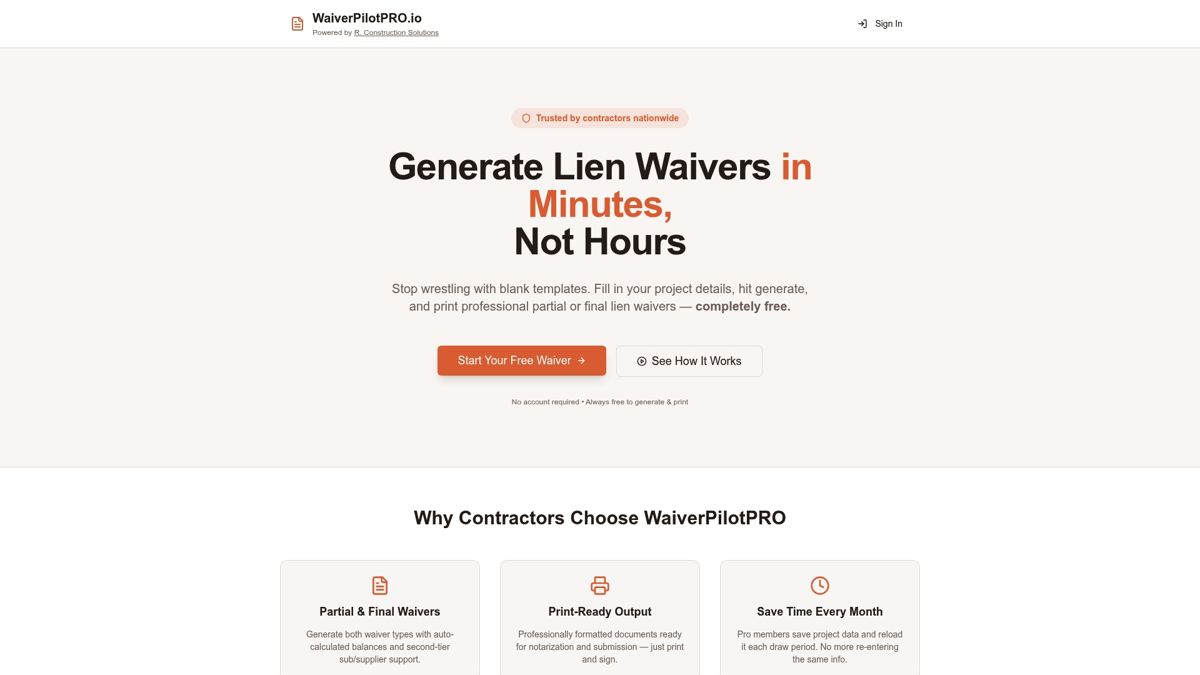
The free lien waiver generator lets you produce conditional, unconditional, partial, and final waivers for any state, with auto-calculated payment fields and notarization-ready PDF output, at no cost. There is no account creation required for basic generation. For GCs managing multiple subcontractors, the Pro tier adds multi-sub batch generation, project saving, and AI-powered contract auto-fill so you are not re-entering the same project details for every waiver. Integrations with Procore, QuickBooks, Buildertrend, Jobtread, and Sage mean your payment data flows directly into the waiver form rather than being typed in by hand.
State-specific templates reflect current statutory language, which matters in states like California and Texas where the required waiver form is set by statute. Generate your waivers, download the PDFs, and submit them with your pay app the same day. Start with the free generator at Waiverpilotpro and see how much time you recover on your next closeout.
Sources
These are the authoritative documents and resources to consult when assembling your closeout package or writing closeout requirements into subcontracts.
- Construction Closeout Documents: What’s Included & Why
- Construction Project Closeout Checklist and Guide | Autodesk
- Construction Closeout Submittals: Complete Guide & Checklist - BuildSync
- Close-Out Checklist (USC)
- NU 01-7700 Closeout Procedures
- Construction Closeout Documentation: A Complete Guide | SpecFunnel
- Close Out Documents (CMAA guidance)
For federal projects, UFGS 01 78 00 governs record document delivery. For public institutional projects, check the owner’s Division 01 specifications first. For private commercial projects, AIA contract documents and your project-specific Division 01 sections are your primary references. In all cases, confirm your state’s lien statute requirements before finalizing any waiver template.
This article is general information, not a substitute for advice from a qualified lawyer. Consult a qualified legal professional about your own circumstances before acting on anything here.