
Construction Data Sync Best Practices for Contractors
Prioritize an API-first, event-aware sync layer with canonical master data and clear operational SLOs. That single architectural decision is the fastest path to reliable, near-real-time construction visibility. Without it, your field data, payroll, ERP, and project controls stay in separate silos, and your team spends its week re-keying numbers instead of managing projects. Manual reconciliation and re-keying can consume approximately 10–15 admin hours per week per project admin, and that cost compounds across every active job.
Three things determine whether your sync program succeeds or stalls:
- Start with high-impact flows. Timecards to payroll, daily logs to ERP job cost, and lien waiver status to invoicing deliver measurable ROI within weeks and give you a clean pilot scope.
- The biggest operational win is live WIP. Connecting Procore daily cost data with ERP job cost actuals eliminates the typical 2–3 week reporting lag, so margin issues surface in time to act on them, not after month-end close.
- Governance is the precondition, not the afterthought. You need named master-data owners and agreed exception-resolution workflows before a single connector goes live. Architecture without ownership fails.
Table of Contents
- What are the main types of construction data sync, and when should you use each?
- What are the core architecture components for a construction sync pipeline?
- Engineering patterns that make construction syncs reliable
- How should you govern construction data syncs and set operational cadences?
- How do you scale construction syncs and keep them observable?
- Security and compliance for U.S. construction data syncs
- Should you build, buy, or use a hybrid approach for construction syncs?
- A phased implementation roadmap for construction data sync
- High-impact construction use cases for data sync
- Key Takeaways
- The part of construction data sync that most teams get wrong
- Waiverpilotpro handles lien waivers so your sync pipeline does not have to
- Useful sources for further reading
What are the main types of construction data sync, and when should you use each?
Not every data flow needs the same latency. Choosing the wrong sync type for a given data class is one of the most common and expensive mistakes in construction project data management. Here is how to match the method to the need.
Batch sync moves a full or incremental data set on a fixed schedule, typically nightly. It works well for payroll exports, monthly forecast uploads, and any data class where a 12–24 hour lag is acceptable. Setup is straightforward, but it offers no visibility into intraday changes.
Scheduled polling queries a source API at a fixed interval, often every 15–60 minutes. Top-performing contractors run agents on this cadence for critical KPIs like labor hours and field quantities. It is a practical middle ground when a source system does not support webhooks or event streaming.

Near-real-time sync typically achieves latency under five minutes using short-interval polling or lightweight webhooks. It suits daily log submissions, RFI status updates, and schedule look-ahead refreshes where a few minutes of lag is acceptable but hours are not.
Event-driven sync / Change Data Capture (CDC) captures changes at the database or application layer the moment they occur and publishes them to a message broker. Latency can reach sub-second. This is the right choice for financial postings, safety alerts, and lien waiver status changes where delays carry real business risk.
| Sync Type | Typical Latency | Setup Load | Best-Fit Construction Use Cases |
|---|---|---|---|
| Batch | 12–24 hours | Low | Payroll exports, monthly forecasts, archive loads |
| Scheduled polling | 15–60 minutes | Low–Medium | Field quantities, labor hours, daily log aggregation |
| Near-real-time | 1–5 minutes | Medium | RFI status, schedule look-ahead, change order tracking |
| Event-driven / CDC | Sub-second to 1 minute | High | Financial postings, safety alerts, lien waiver status |
CDC vs. webhooks vs. polling. CDC reads the database transaction log directly, so it captures every change regardless of whether the application exposes an API endpoint for it. Webhooks are application-layer push notifications, faster to implement but dependent on the source system’s reliability. Polling is the fallback when neither CDC nor webhooks are available. In construction environments with intermittent field connectivity, event-driven pipelines with durable message queues are the most resilient choice because they buffer events while a device is offline and replay them on reconnection.
One more pattern worth noting: enrichment and master-data refresh. Enrichment, adding cost codes, project IDs, or vendor classifications to a raw event, is usually scheduled rather than live. A nightly or hourly enrichment pass keeps the canonical model current without adding latency to the critical event path.
What are the core architecture components for a construction sync pipeline?
Think of your sync architecture as a chain with seven links. Every link must hold for data to flow cleanly from a field app to your ERP or reporting layer. Middleware sits at the center of that chain, normalizing payloads, enforcing validation, routing transactions, and handling retries and dead-letter queues.
Here is the full component list, in order of data flow:
- CDC engine or change capture layer — Reads the database transaction log or application event stream to detect changes. For cloud-native systems like Procore, webhook subscriptions serve this role. For legacy ERPs, a CDC tool reading the transaction log is often the only safe option.
- Message broker / event bus. A durable queue, such as Apache Kafka or a managed equivalent, that buffers events between producer and consumer. This decouples source systems from targets and provides replay capability when a downstream system is unavailable.
How the components connect
The recommended flow is: Source → CDC/Connector → Event Bus → Transformer → Enrichment → Canonical Model → Sink. Assign a correlation ID at the source connector and propagate it through every component. When a posting fails in the ERP, that ID lets you trace the event back to the originating field entry in under two minutes, rather than hours of log-hunting.
Master-data sync vs. transactional sync. Keep these on separate pipelines. Master-data changes (new cost codes, employee records, project setups) are low-volume but high-impact; they need approval gates and audit trails. Transactional events (daily log entries, timecard punches, invoice postings) are high-volume and time-sensitive. Mixing them on the same pipeline creates priority conflicts and makes incident triage harder.

For large portfolios, a hybrid architecture works best: APIs at the edge for triggers, a governed data warehouse in the middle for reporting, and event streaming for near-real-time updates. That combination gives you speed where it matters and governance where it counts.
Engineering patterns that make construction syncs reliable
Reliable construction data integration methods come down to a handful of engineering rules. Get these right and your sync pipeline handles the messy realities of field operations: late mobile syncs, duplicate entries from offline reconnects, and schema changes mid-project.
The core rules
- Schema versioning — Use a schema registry (Confluent Schema Registry is a common choice for Kafka-based stacks) and version every message schema. Consumers declare the version they support; the transformer handles backward compatibility. This lets you deploy schema changes without coordinating a simultaneous cutover across all systems.
Conceptual patterns for idempotency and correlation
For idempotent invoice posting, the logic looks like this in plain terms: before writing a record to the ERP, check whether a record with the same idempotency key already exists. If it does, return success without writing. If it does not, write the record and store the key. This two-step check-then-write pattern, executed within a database transaction, prevents duplicate postings even when the source retries after a network timeout.
For correlation ID propagation, the pattern is simpler: when the source connector creates a message, it generates a UUID and stores it in a standard header field (for example, X-Correlation-ID). Every downstream service reads that header, logs it with every operation it performs, and passes it forward in any outbound call. When an error surfaces in the ERP, the support team queries logs by that ID and sees the full event history across every component.
Pro Tip: Lock your posting windows. For payroll and invoice flows, define a reconciliation window (for example, the 24 hours after a pay period closes) during which the idempotency key is checked against a reconciliation table. Any event arriving outside that window goes to a manual review queue rather than posting automatically. This single rule prevents the majority of duplicate payroll entries.
How should you govern construction data syncs and set operational cadences?
Integration projects most often fail because governance and operational ownership were not defined before go-live, not because of the architecture. The technical patterns in the previous section only work if the right people own the right decisions.
Governance checklist
Before your pilot goes live, confirm each of the following:
- Master-data stewards. Name one person responsible for each master-data domain: cost codes, employee records, vendor records, project setup. They approve changes and resolve mapping conflicts.
- Exception-resolution owners. For each critical flow (timecards, payroll, WIP, lien documents), name the person who triages DLQ events within the agreed SLO window.
- Mapping approval process. Any change to a field mapping or cost code structure requires sign-off from the master-data steward and the downstream system owner before deployment.
- Schema and versioning policy. Define who can publish a new schema version, what backward-compatibility rules apply, and how long old versions are supported.
- SLOs for critical flows. Write them down and share them with every stakeholder before go-live. An SLO that lives only in a Confluence page no one reads is not an SLO.
Recommended sync cadences and SLOs
Common operational rhythms for construction data are daily for field quantities and labor hours, weekly for schedule updates and look-aheads, and monthly for forecasts. Financial and safety alerts often need event-driven sub-15-minute completion.
| Data Class | Recommended Cadence | Example SLO | Notes |
|---|---|---|---|
| Daily logs / field quantities | Daily (end of shift) | Delivered to ERP within 2 hours of submission | Batch acceptable; near-real-time preferred |
| Timecards | Daily (or at punch-out) | Posted to payroll within 4 hours | Idempotency key required |
| Payroll submissions | Weekly / bi-weekly | Confirmed in payroll system within 1 hour of cutoff | Hard deadline; DLQ alert within 15 minutes of failure |
| Schedule look-ahead | Weekly | Refreshed in BI dashboard within 30 minutes | Polling cadence of 15–60 minutes sufficient |
| WIP / job cost actuals | Near-real-time | ERP updated within 15 minutes of Procore event | Event-driven preferred; sub-15-minute SLO |
| Forecasts | Monthly | Available in warehouse by business day 2 | Batch; enrichment pass required |
| Lien / financial documents | Event-driven | Status updated within 10 minutes of approval | Compliance-critical; immutable log required |
| Safety alerts | Event-driven | Delivered within 5 minutes of incident report | Highest priority; safety management software may provide native alerting |
Running the pilot cadence
Hold a weekly integration review during the pilot. Attendees should include the integration lead, a representative from field operations, the payroll or finance owner, and the IT or platform owner. The agenda is short: review DLQ counts, check SLO adherence, and clear any mapping exceptions before they accumulate. Keep the meeting to 30 minutes. If it runs longer, you have unresolved governance gaps, not a meeting problem.
Pro Tip: Before pilot, lock down a small set of master-data fields: project ID, cost code, employee ID, and vendor ID. Freeze changes to those fields for the duration of the pilot. Every mapping exception during pilot will trace back to one of these four fields, and locking them gives you a clean baseline to measure against.
How do you scale construction syncs and keep them observable?
Scaling a sync pipeline is not just a throughput problem. It is an observability problem. If you cannot see what is happening inside the pipeline, you cannot tell whether a slowdown is a field connectivity issue, a rate-limit hit, or a downstream ERP timeout.
Key monitoring KPIs
Track these metrics for every critical flow:
- End-to-end latency percentiles (P50, P95, P99). The P99 tells you what your worst-case experience looks like. If your SLO is 15 minutes and your P99 is 14 minutes, you have almost no headroom.
- Processing throughput. Events processed per minute, per flow. Spikes at shift-end are predictable; your pipeline should handle them without degrading latency.
- Rejection and mapping error rates. A rising rejection rate usually means a schema change in a source system that your transformer has not caught yet.
- DLQ size. Any event in the DLQ is a data gap. Alert immediately when DLQ size exceeds zero for financial or compliance flows.
- End-to-end transaction time. The wall-clock time from source event creation to confirmed write in the target. This is the number your business stakeholders care about.
Practical scaling techniques
Partitioning. Partition your event bus by project ID or cost center. This prevents a high-volume project from starving lower-volume ones and makes it easier to isolate failures to a single project.
Batching for high-volume field events. At shift-end, hundreds of timecard punches may arrive simultaneously. Micro-batch them into groups of 50–100 before sending to the ERP to avoid overwhelming the target API. The idempotency key ensures no duplicates even if a batch is replayed.
Asynchronous processing for field spikes. Accept field events into the message broker immediately and process them asynchronously. This keeps the mobile app responsive even when the ERP is under load.
Rate-limit handling. Monitor API quota consumption in real time. When you reach 80% of your hourly quota, switch to a slower polling interval automatically. Build this logic into the connector, not as a manual intervention.
Example SLO targets
For payroll posting: the event should be confirmed in the payroll system within one hour of the pay period cutoff, with a DLQ alert firing within 15 minutes of any failure. For WIP updates: Procore cost events should appear in the ERP within 15 minutes, with a P95 latency alert at 12 minutes. For schedule sync: the BI dashboard should reflect the latest look-ahead within 30 minutes of the weekly schedule publish.
Observable integration platforms that support idempotency keys and correlation IDs dramatically reduce mean time to resolution (MTTR) for sync failures. When a payroll posting fails at 5:00 PM on a Friday, a correlation ID lets your support team trace the event from the field app to the ERP in minutes, not hours.
Security and compliance for U.S. construction data syncs
Construction data flows carry sensitive information: Social Security numbers in payroll feeds, bank account details for direct deposit, and lien document status that affects payment rights. A security gap in your sync pipeline is not just an IT problem; it is a legal and financial exposure.
Security checklist
- Encryption in transit. All API calls and message broker connections must use TLS 1.2 or higher. No exceptions for internal network traffic; assume the network is untrusted.
- Encryption at rest. Message payloads stored in the event bus, DLQ, or data warehouse must be encrypted at rest using AES-256 or equivalent.
- OAuth2 and token rotation. Use OAuth2 with short-lived access tokens for all API connections. Rotate tokens on a schedule (typically every 24 hours) and revoke immediately on personnel changes.
- Role-based access control (RBAC). Grant each service account only the permissions it needs. A connector that reads timecard data should not have write access to the ERP chart of accounts.
- Scoped API keys. When OAuth2 is not available, use API keys scoped to specific endpoints and rotate them quarterly.
- Secure credential storage. Store all secrets in a dedicated secrets manager (AWS Secrets Manager, HashiCorp Vault, or Azure Key Vault). Never store credentials in environment variables, config files, or source code.
PII and payroll handling
Limit PII in message payloads to the minimum necessary. For payroll flows, use employee IDs rather than SSNs wherever the downstream system allows it. When SSNs or bank account numbers must transit the pipeline, tokenize them at the source connector and detokenize only at the authorized target. Keep a minimal, immutable audit trace of who accessed the detokenization service and when.
HIPAA does not typically apply to construction payroll data, but state-level privacy laws (California’s CCPA, for example) may govern how you store and transmit employee PII. Check the applicable rules for each state where you operate.
Logging and auditability
Financial postings require immutable logs. Write every posting event, including the correlation ID, timestamp, source record ID, and posting result, to an append-only log store. Keep these logs for at least seven years to satisfy typical construction contract audit requirements. Master-data changes (cost code additions, employee record updates) need a separate change-history log with the approver’s identity and timestamp.
Vendor and contractual requirements
When you use a managed iPaaS or CDC vendor, your data processing agreement (DPA) should specify: maximum data retention periods, incident notification timelines (typically 72 hours for a breach), SLAs for connector uptime, and the vendor’s responsibility for encryption key management. Do not assume these terms are in the standard contract; negotiate them explicitly.
Should you build, buy, or use a hybrid approach for construction syncs?
The build-vs-buy decision is not primarily a technology question. It is a question of where your team’s time is best spent and how quickly you need results.
Decision checklist
Before committing to an approach, answer these questions:
- How many source systems do you need to connect, and do pre-built connectors exist for them?
- What is your target latency, and can a managed solution meet it?
- Who will own ongoing connector maintenance when source APIs change?
- What is your expected event throughput at peak (shift-end, month-end)?
- Do you have compliance requirements (SOC 2, state payroll regulations) that a vendor must certify against?
- What is your total cost of ownership over three years, including engineering time for a custom build?
Build, buy, and hybrid compared
Custom pipelines give you maximum control over data handling, latency tuning, and security posture. The trade-off is significant: building and maintaining connectors for Procore, your ERP, and your payroll system requires dedicated engineering capacity. Every time a source API changes, your team absorbs the update cost. Legacy systems may also require direct database access rather than clean API calls, which introduces security risk and bypasses application-level validations.
Managed iPaaS and CDC platforms offer pre-built connectors, visual mapping tools, and built-in observability. Time-to-value is faster, often measured in weeks rather than months. The risk is vendor lock-in and the possibility that the platform’s canonical model does not match your cost code structure without significant configuration.
Hybrid is the pragmatic sweet spot for most contractors. Use a managed iPaaS or pre-built connectors for the source-to-broker leg (where connector coverage and API maintenance matter most), and build your own transformation and enrichment layer (where your cost code logic and canonical model live). This approach keeps your business logic in-house while offloading connector maintenance to a vendor.
Vendor qualification questions
When evaluating a managed solution, ask:
- Does the platform support idempotency keys and correlation IDs natively?
- How does it handle schema changes in source systems?
- What is the DLQ triage workflow, and can we replay events on demand?
- Does it support multi-entity (multi-company) construction environments?
- What is the rollback strategy if a bad deployment corrupts downstream data?
- Is the platform SOC 2 Type II certified?
A phased implementation roadmap for construction data sync
A construction sync program that tries to connect everything at once almost always stalls. A phased approach, starting with one high-impact flow and expanding from there, delivers faster wins and builds the organizational muscle you need for broader rollout.
Phase 1: Discovery (weeks 1–2)
- Inventory every source system: field apps, scheduling tools, payroll processor, ERP, and any spreadsheet-based processes that feed financial reporting.
- Identify the data owner and technical contact for each system.
- Map the three highest-impact data flows by business value (typically: timecards to payroll, daily logs to ERP job cost, and lien waiver status to invoicing).
- Document current data quality issues: missing cost codes, inconsistent employee IDs, duplicate vendor records.
- Confirm API availability and authentication method for each source system.
Phase 2: Master-data remediation (weeks 2–4)
- Clean and standardize the four critical master-data fields: project ID, cost code, employee ID, and vendor ID.
- Assign a named steward to each master-data domain.
- Publish the canonical model and get sign-off from field ops, finance, and IT.
- Freeze master-data changes for the duration of the pilot.
Phase 3: Pilot (weeks 4–12, typically 4–8 weeks for a small pilot)
- Select one to three active projects as the pilot scope.
- Deploy connectors and the transformation layer for the single highest-impact flow.
- Run the weekly integration review (field ops, finance, IT, integration lead).
- Monitor DLQ counts, latency percentiles, and mapping error rates daily.
- Validate data correctness: compare sync output against source records for a sample of transactions each week.
Phase 4: Validation gates
- Data correctness threshold: target 99% or higher match rate between source and target for financial records.
- Latency target: P95 end-to-end latency within the agreed SLO for each flow.
- Exception rate: fewer than 1% of events routed to DLQ after the first two weeks of pilot.
- Stakeholder sign-off: field ops and finance leads confirm the data is usable for operational decisions.
Phase 5: Scale and rollout
- Expand to the next highest-impact flow, then the next, following the priority sequence from discovery.
- Add projects in batches of five to ten, monitoring throughput and latency at each step.
- Publish the operational runbook to all stakeholders before each new flow goes live.
Operational runbook checklist
- Incident playbook: step-by-step response for each failure mode (DLQ overflow, API rate limit hit, schema mismatch, target system unavailable).
- Rollback triggers: define the conditions under which you revert to manual data entry (for example, DLQ size exceeds 100 events for a financial flow, or P99 latency exceeds twice the SLO).
- DLQ triage steps: who receives the alert, how quickly they must respond, and how to replay events after the root cause is resolved.
- Support escalation path: tier-1 (integration team), tier-2 (platform vendor), tier-3 (source system vendor).
Cutover and rollback guidance
Use a blue/green promotion strategy: run the new sync pipeline in parallel with the existing manual process for at least two weeks before cutting over. Keep a read-only historical snapshot of all pre-cutover data for audit purposes. If a rollback is triggered, the manual process resumes immediately while the integration team resolves the issue. Never cut over on a Friday or the day before a payroll deadline.
High-impact construction use cases for data sync
The goal of construction data synchronization is to create what practitioners call an “operating intelligence” layer: a live view of cost, schedule, and compliance that shifts your team from reactive month-end reports to catching problems weeks earlier. These four use cases deliver the clearest ROI.
Daily logs to ERP job cost (WIP)
Flow: Field supervisor submits daily log in Procore → webhook fires → transformer maps quantities and labor hours to ERP cost codes → ERP job cost actuals updated.
Latency requirement: Within 15 minutes of log submission during working hours.
Top failure mode: Cost code mismatch between Procore and ERP. Mitigation: canonical cost code mapping enforced at the transformer, with a DLQ alert for any unmapped code.
Business impact: Eliminates the 2–3 week reporting lag that typically delays WIP reporting. Finance teams can see job cost actuals the same day work is performed, enabling earlier corrective action on margin issues.
Timecards to payroll to ERP
Flow: Worker clocks out in field app → timecard event published to event bus → transformer validates hours against project schedule → payroll system receives confirmed hours → ERP receives labor cost posting.
Latency requirement: Payroll confirmed within four hours of punch-out; ERP labor cost posted within one hour of payroll confirmation.
Top failure mode: Duplicate timecard entries from offline reconnect. Mitigation: idempotency key derived from employee ID plus shift date plus project ID.
Business impact: Reduces payroll processing time and eliminates manual re-keying. Administrative re-keying alone can consume 10–15 hours per week across a typical project admin team.
Change events (Procore) to ERP job cost actuals
Flow: Change order approved in Procore → change event published → transformer maps to ERP change order record → ERP job cost budget updated.
Latency requirement: ERP updated within 15 minutes of approval.
Top failure mode: Change order approved in Procore but rejected by ERP validation (missing cost code, budget exceeded). Mitigation: pre-validation check against ERP rules before publishing the event, with a DLQ alert and finance team notification on rejection.
Business impact: Keeps ERP budget actuals current with field reality. Without this sync, budget-to-actual comparisons are stale by the time they reach the project manager.
Lien waiver status to invoicing and compliance
Flow: Subcontractor submits lien waiver → status event published → invoicing system updates payment eligibility → compliance dashboard reflects current waiver status.
Latency requirement: Status updated within 10 minutes of waiver submission or approval.
Top failure mode: Waiver type mismatch (conditional vs. unconditional) causing incorrect payment release. Mitigation: enforce waiver type validation at the transformer, with a hold on payment release until the correct type is confirmed.
Business impact: Faster payment cycles and reduced lien disputes. When waiver status flows automatically into your invoicing system, you eliminate the manual chase for paper waivers that delays payment approvals. For pay application workflows, this sync also feeds directly into AIA G702 and G703 payment application processing.
Key Takeaways
Reliable construction data sync requires an API-first, event-aware architecture with canonical master data, named governance owners, and SLOs agreed before any connector goes live.
| Point | Details |
|---|---|
| Start with high-impact flows | Timecards to payroll, daily logs to ERP, and lien waiver status to invoicing deliver the fastest measurable ROI. |
| Governance before architecture | Name master-data stewards and exception owners before go-live; most sync failures trace to ownership gaps, not technical faults. |
| Idempotency and correlation IDs | Apply idempotency keys to every financial posting and propagate correlation IDs across all components to prevent duplicates and speed incident resolution. |
| Pilot in 4–8 weeks | Run a focused pilot on one to three projects; validate at 99% data correctness and P95 latency within SLO before expanding. |
| Waiverpilotpro for lien waivers | Waiverpilotpro integrates with Procore, Buildertrend, JobTread, and QuickBooks to automate lien waiver generation and feed waiver status into your invoicing and compliance workflows. |
The part of construction data sync that most teams get wrong
Most teams treat data sync as a technology project. They pick a platform, map a few fields, and expect the pipeline to run itself. The ones that succeed treat it as an operational change program with technology underneath.
The pattern I see most often is this: a contractor invests in a solid integration architecture, runs a clean pilot, and then hits a wall at scale. Not because the pipeline breaks, but because no one agreed on who owns the exceptions. A timecard event lands in the DLQ at 4:45 PM on a Thursday, and three teams spend 90 minutes deciding whose problem it is. That is not a technology failure. It is a governance failure that the technology exposed.
The other mistake is launching a full-scope sync before cleaning master data. Connecting ten systems to a canonical model built on inconsistent cost codes and duplicate vendor records does not fix the inconsistency; it propagates it at machine speed. The contractors who get the most out of near-real-time WIP and live operating intelligence are the ones who spent two to four weeks doing unglamorous master-data cleanup before writing a single connector.
One thing you can do today: pull a sample of 50 transactions from your highest-volume data flow and check how many have a valid, consistent cost code, employee ID, and project ID. If the answer is less than 95%, that is your starting point, not your connector configuration.
Waiverpilotpro handles lien waivers so your sync pipeline does not have to
One of the highest-friction points in the lien waiver to invoicing flow is the waiver document itself: generating the right type (conditional, unconditional, partial, or final), for the right state, with the right payment figures, and getting it into your system fast enough to keep payment moving.
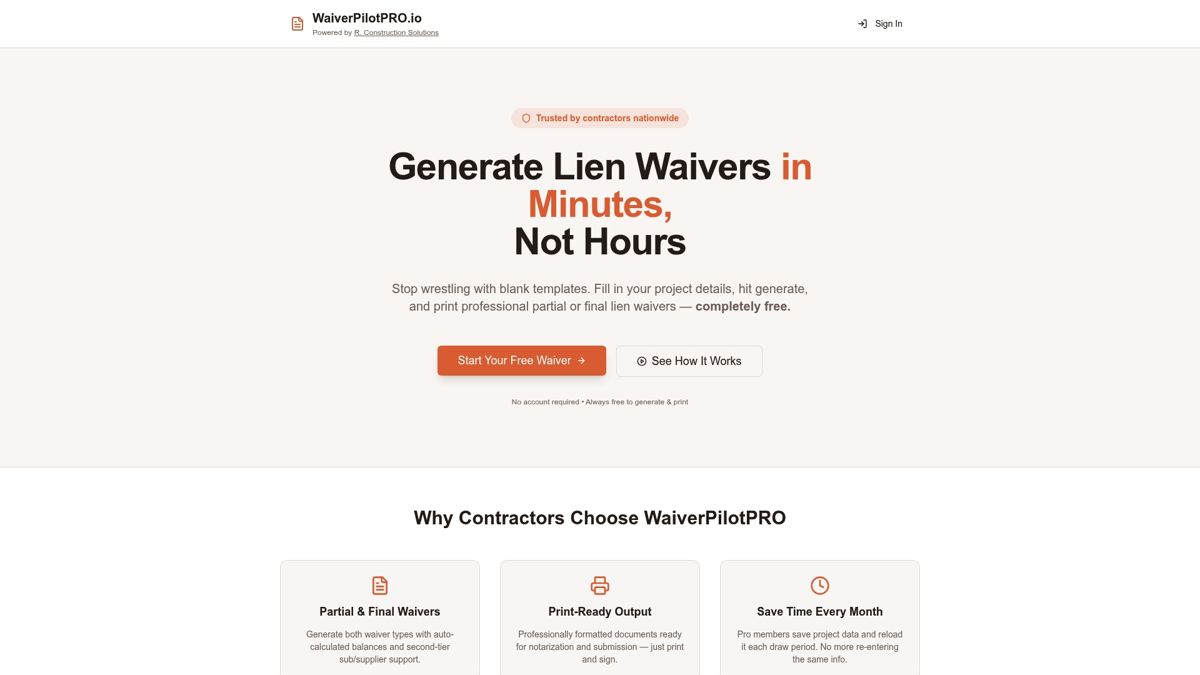
Waiverpilotpro is built specifically for this. Contractors and subcontractors can generate state-specific, notarizable lien waivers in minutes, with auto-calculated payment balances and multi-subcontractor support, at no cost for the core generator. The platform integrates directly with Procore, Buildertrend, JobTread, QuickBooks, and Sage, so waiver status can flow into your invoicing and compliance workflows without manual re-entry. For teams on the Pro plan, AI-powered contract auto-fill pulls project details directly from uploaded contracts, cutting document prep time further.
If lien waiver handling is one of the manual bottlenecks your sync program is trying to solve, start with the free lien waiver generator and see how much of that process you can automate today.
Disclosure: Waiverpilotpro is the publisher of this article.
Useful sources for further reading
These are the most useful references for teams planning or improving a construction data sync program. Start with the architecture and governance sources before moving to the use-case and tooling references.
- Design and govern a construction data spine — PCTRL: The clearest single reference for operational sync cadences and SLO guidance. Read this first when planning your governance framework.
- Construction middleware integration tactics — SysGenPro: Detailed coverage of middleware patterns, validation, enrichment, and DLQ handling for field-to-payroll-to-ERP flows.
- Integration patterns for project controls, AP automation, and ERP — SysGenPro: Focuses on idempotency keys and correlation IDs in practice; essential reading for the engineering patterns section.
- Connectivity strategy for construction operational data flows — SysGenPro: Strong on governance and the human side of integration failure; read before your pilot kickoff.
- Operating intelligence for construction companies — Fairview: Makes the business case for live WIP and near-real-time Procore-to-ERP sync; useful for executive briefings.
- Real-time construction dashboards with AI — Mirage Metrics: Covers agent-based polling cadences and pilot timelines; good reference for architecture and scheduling decisions.
- Construction data integration and automated reporting — BatchData: Best reference for hybrid architecture patterns at portfolio scale.
- The true cost of data islands in construction — BidBookSoft: Quantifies the administrative cost of manual reconciliation; use this to build the business case for sync investment.
- The limits of all-in-one legacy systems for construction finance — Baker Tilly: Important context for teams integrating legacy ERPs; covers the risks of direct database access.
- Apache Kafka documentation: The primary reference for event streaming architecture; relevant for teams evaluating open-source message broker options.
- Construction safety management software — My Safety Solution: Useful context on safety workflow priorities and how safety incident data fits into a broader sync cadence strategy.