A subcontractor preparing one waiver for a draw and a general contractor collecting documents from twenty vendors have different problems. The first needs an accurate document. The second also needs requests, approvals, payment coordination and a record of missing items. Choosing a SunrayNotice alternative starts with deciding which problem you need to solve—not with a promise that every tool makes waivers faster or legally compliant.
This comparison separates document generation from broader payment and notice-management workflows, then shows how to prepare progress and final waivers using illustrative payment figures. WaiverPilotPRO.io is published by R. Construction Solutions; it is included here as our own document-generation tool, not as an independently ranked winner.
Not legal advice: This article provides general information. Waiver language, exceptions, signing rules and legal effect vary by state and circumstances. Check every waiver against current state requirements and consult a licensed construction attorney before relying on it.
Key takeaways
- Compare tools by the work you actually need: document preparation, waiver collection, payment administration or notice deadlines.
- Reuse verified project data, but review payment amounts, through-dates and exceptions for every draw.
- Payment status and payment stage are separate decisions; a progress or final waiver may be conditional or unconditional where the applicable rules provide for those choices.
- Signature records help document a transaction, but do not make an incorrect form enforceable.
- Measure preparation, review and collection separately rather than relying on an unsupported “under three minutes” promise.
Table of contents
- Compare SunrayNotice alternatives by workflow
- How fast waiver generation works
- Worked progress and final payment examples
- Manual drafting versus digital preparation
- Payment and project workflow controls
- Template selection and review checklist
- Frequently asked questions
Compare SunrayNotice alternatives by workflow
SunRay describes notice and lien services, deadline resources, and waiver management. Its waiver-management page describes creating, sending, signing and tracking waivers. Replacing a form generator does not necessarily replace notice services or deadline monitoring. List the parts of your current process you need to retain before switching.
| Option | Workflow focus | What to confirm before choosing |
|---|---|---|
| WaiverPilotPRO.io | Preparing and printing lien waiver documents from project and payment details | Whether document preparation is sufficient, or you also need a separate signing and collection system |
| GCPay | Payment applications, lien waiver management, compliance tracking and accounting connections | Your accounting system, approval process and required payment workflow |
| Trimble Pay | Subcontractor billing and payment administration | Current waiver, compliance and accounting capabilities in the proposed setup |
| Levelset | Lien waiver tools and state-law resources | Which waiver and notice-management services meet your project needs |
| Vertical | Construction lien waiver management | Current collection, lower-tier and project-system capabilities in a demonstration |
This is a workflow comparison, not a pricing survey or a ranking. Product names and offerings can change. Confirm current features, integrations, fees and contract terms directly with each provider.
WaiverPilotPRO.io: document preparation
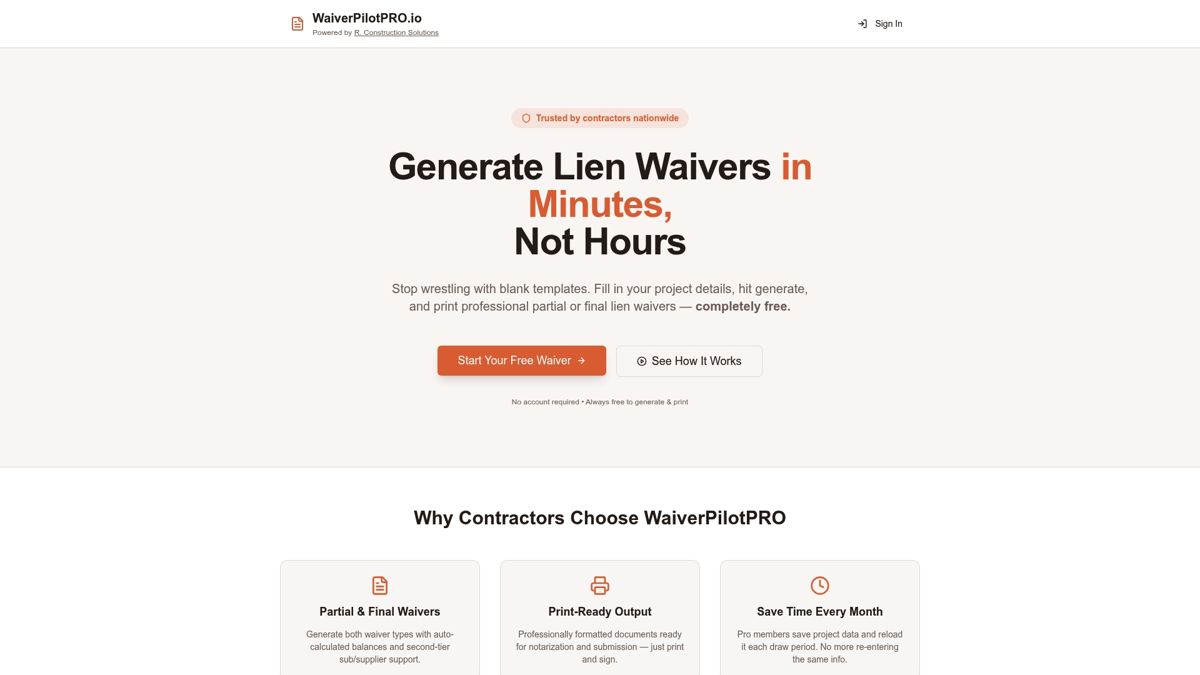
WaiverPilotPRO lets you enter project and payment information, calculate remaining balances, and generate print-ready waiver documents. It offers conditional and unconditional selections for progress and final payments, subject to the available form choices for the selected state. Optional Pro features include saved projects, Word downloads, multi-subcontractor waivers and AI-assisted extraction from uploaded contracts or payment applications. Extracted information still needs human review.
The first three waivers are free without an account; unlimited free generation and printing are available after email/contact capture. Do not assume that an article about using Procore, QuickBooks, Sage, JobTread or Buildertrend means there is a live connection to those systems. Use verified records from your existing software and check the transferred figures. Generating a document is not the same as routing an electronic signature, releasing a payment or retaining an e-signature audit trail.
GCPay: payment-application administration
GCPay's official comparison material describes payment-application workflows, lien waiver management, compliance tracking, ERP integrations and electronic payments. That broader scope makes it worth evaluating when the bottleneck is subcontractor billing and accounting handoffs rather than preparing an individual form. Ask the vendor to demonstrate the complete approval-to-payment process with your accounting setup.
Trimble Pay: billing and payment workflows
Trimble Pay describes subcontractor payment applications, compliance tracking, approval and payment controls, lien-waiver management, and connections to construction and accounting systems. Evaluate it when the draw process needs those connected controls rather than only a document. Ask for a demonstration using your own draw package and confirm the exact supported accounting setup; do not assume a particular processing-time reduction.
Levelset: waiver tools and lien resources
Levelset's lien waiver materials describe waiver tools and resources. Its state-law guidance can be a starting point for researching project requirements. If you also need notices or lien-related services, verify the current scope directly. Published guidance does not replace checking the current law or getting advice on a disputed payment.
Vertical: evaluate the collection process
Vertical describes requesting, preparing, reviewing, approving and tracking lien waivers, organizing draw documents, and supporting lower-tier labor and suppliers. Its official site also describes a Procore connection. Ask it to demonstrate which contract and payment fields transfer, who approves each document, and how lower-tier records and signed copies are retained in your proposed setup.
How fast waiver generation works
Fast generation means reducing repeated entry and avoidable handoffs—not skipping review. Start with a verified project record, add the current payment details, select the appropriate form, review the populated document, and send it through your agreed signing process.
- Gather the source records. Use the contract, approved changes, current pay application and actual payment ledger. Keep the owner, claimant, customer and job address consistent.
- Separate stage from status. Decide whether this is a progress draw or final payment. Separately confirm whether funds have cleared. Where appropriate under current state requirements, use a conditional form while payment is pending and an unconditional form only after verifying receipt.
- Populate the document. Reuse checked project details, but update the amount, through-date, payment reference and permitted exceptions for this transaction.
- Review before signing. Check the actual waiver wording, not just the label on the screen. A correct amount cannot fix an overly broad release.
- Store the completed record. Keep the signed document with the supporting pay application and payment evidence. Track a draft separately from a signed or effective waiver.
Generation methods: from templates to automation
- Template-based preparation: Populate a reviewed form from a project record. This is a practical starting point for a small job with a limited number of claimants.
- Payment-linked workflows: A configured system can prepare requests from approved payment data. Confirm its actual controls; do not assume a missing waiver automatically blocks funds.
- Self-hosted or command-line preparation: A technical team can generate documents from structured data, but must maintain form versions, security and review procedures. A generic participation or liability waiver generator is not a substitute for a construction lien waiver.
- AI or natural-language assistance: Extraction or commands can reduce typing where a tool supports them. Require review of names, amounts and the selected form, and keep approval separate from document creation.
Worked progress and final payment examples
The following figures are illustrative, not customer case studies or guaranteed outcomes. They show the checks behind document preparation; the proper release language and exceptions depend on current state requirements.
Example 1: a progress draw before funds clear
A subcontract has an adjusted contract value of $100,000, with $40,000 previously paid. The current approved payment is $15,000 for work through October 15. The pre-payment remaining balance is $60,000; after this payment it would be $45,000. The waiver amount for this transaction is $15,000—not the full contract value or the $60,000 remaining balance.
If payment is still pending, prepare the appropriate conditional progress waiver where the state's rules permit it. Confirm the October 15 through-date, any retainage or unpaid extras, and the claimant's identity. After receipt is verified, prepare the matching unconditional progress waiver if required and appropriate, checking its scope against the actual payment.
Example 2: final payment that does not match the balance
An adjusted contract is $120,000 and prior payments total $95,000, leaving $25,000 before the final payment. A proposed payment of $20,000 leaves a $5,000 difference. Do not silently treat that difference as settled: reconcile retainage, approved changes, deductions and disputes before signing a final release.
WaiverPilotPRO warns when a final-payment amount differs from contract value less previous payments and asks for confirmation before proceeding. Continuing past that warning does not preserve rights to the difference. Resolve the issue and obtain legal advice about the form's effect when money remains disputed.
Example 3: multiple subcontractors and lower-tier claimants
A draw includes $12,000 for an electrical subcontractor and $8,000 for a drywall subcontractor. Prepare each claimant's document against its own contract and payment record rather than issuing a single $20,000 waiver in both names. If the electrician owes a supplier $3,000 for the job, track the supplier separately and determine what supporting waiver is needed. A first-tier waiver is not proof that every lower-tier party has been paid.
Maintain a register with project, claimant, draw, amount, through-date, payment status and signed-document location. This works in a spreadsheet or a configured collection platform; the essential control is keeping every record tied to the right transaction.
Manual drafting versus digital preparation
| Task | Manual preparation | Digital preparation | Review still required |
|---|---|---|---|
| Project details | Copied into each document | Reusable data where supported | Correct party names and job address |
| Payment figures | Entered from source records | Calculated or populated where supported | Approved amount versus actual payment |
| Form selection | Selected from a maintained library | Selected using available controls | Current state requirements and legal scope |
| Signatures and records | Collected and filed separately | Tracked by a signing/collection tool if provided | Authority, completed copy and payment evidence |
Measure draft preparation, correction time and signature collection separately during a pilot. A quickly created draft can still wait days for approval, and automatic population can repeat a wrong source value. Neither method guarantees an error-free document or faster payment.
Payment and project workflow controls
Make waiver preparation part of the draw process rather than paperwork discovered at payment day. Assign an owner for review, agree on deadlines with claimants, and use reminders for missing documents. If software supports payment holds, establish the actual rules and exceptions with your finance team; a generator alone does not control a bank transfer.
For a proposed accounting or project connection, test which fields transfer, whether updates overwrite reviewed data, how changes are logged, and who can approve a release. Keep signing records, delivery evidence and the final document. Electronic-signature evidence can help establish who signed and when, but enforceability also depends on the form, authority, transaction and applicable law.
Template selection and review checklist
- Check the current requirements for the state where the project is located; do not assume one template works nationwide.
- Confirm payment stage, payment status and the actual release language. State-prescribed forms do not always follow four distinct choices.
- Match each claimant's amount and through-date to the corresponding payment and work period.
- Review retainage, unpaid extras, change orders and other exceptions only as permitted by the form and current law. Do not casually rewrite mandatory language.
- Check signer authority, signature requirements and notarization where applicable.
- Include relevant suppliers and lower-tier claimants in your collection plan.
- Maintain a versioned form library and review it when requirements change; a twice-yearly review can be a useful administrative reminder, not a guarantee of currency.
- Resolve open balances before final release and store signed records where the project team can retrieve them.
For field-by-field help, see how to fill out a lien waiver, conditional versus unconditional waivers, and notarization considerations.
Frequently asked questions
Which SunrayNotice alternative should I choose?
Choose by workflow: document generation, waiver collection, payment administration or notice management. Check current vendor capabilities with your own draw package before replacing a service.
What is fast waiver generation in construction?
It is preparing a lien waiver from reusable project data and current payment records instead of retyping a document. Preparation speed varies; form selection, review and signing still need attention.
How do I generate waivers for multiple subcontractors?
Use a separate claimant record and payment amount for each subcontractor, then track relevant suppliers and lower-tier parties separately. Keep each signed waiver linked to its own draw and payment evidence.
What is the difference between conditional and unconditional lien waivers?
A conditional waiver generally depends on receipt of the specified payment; an unconditional waiver may release rights without that condition. Verify payment before signing an unconditional waiver and check the form against current state requirements.
Does quick generation or an e-signature audit trail make a waiver enforceable?
No. Speed and signature records alone do not establish enforceability. The wording, signer authority, payment circumstances and applicable state law also matter.
Can I use a waiver template for a small construction project?
A reviewed template can help with preparation, but project size does not remove state-law requirements. Check the payment stage, amount, through-date and exceptions before using it.
How does GCPay differ from WaiverPilotPRO?
GCPay describes payment-application, waiver, compliance and accounting workflows. WaiverPilotPRO focuses on preparing waiver documents, with optional Pro features for saved projects, Word downloads, multi-subcontractor waivers and AI-assisted extraction.
How does WaiverPilotPRO use AI-assisted extraction?
Optional Pro extraction reads uploaded contracts or payment applications to suggest waiver details. Review those details against the original records; extraction is not legal review or confirmation of payment.
Does WaiverPilotPRO automatically sync with my accounting software?
Do not assume a live synchronization connection. Use verified project and payment records from your existing software and review any transferred or extracted values before generating a waiver.
What should I check before signing a final waiver?
Reconcile the remaining contract balance, retainage, change orders, deductions and disputes against the proposed payment. A warning or a smaller payment does not limit the legal scope of a final release.
Prepare your next waiver
Use the free lien waiver generator to prepare a document from your checked project and payment records. Review the result against current state requirements before signing or sending it.