
Multi-Project Waiver Tracking Strategies for Contractors
The most effective multi-project waiver tracking strategy centers on one thing: a centralized, integrated waiver registry tied directly to your payables, with automated holds and reminders enforcing compliance before funds move. Get that foundation right, and missed waivers become the exception rather than the rule.
Here’s what that system requires:
- A centralized registry that tracks every expected and received waiver across all active projects
- State-specific templates covering conditional progress, unconditional progress, conditional final, and unconditional final waiver types
- Two-way integrations with your PM and accounting software (Procore, QuickBooks, Buildertrend, JobTread, Sage)
- Bulk generation triggered automatically when pay apps are approved
- Signing workflows that accommodate e-signature, notarization, and low-tech subcontractors
- Reconciliation and audit trail matching every signed waiver to a cleared payment
When these pieces work together, you close out faster, dispute fewer liens, and spend far less time chasing signatures at month-end.
Pro Tip: Don’t try to build all six components at once. The single biggest implementation mistake is going live across your entire portfolio before you’ve tested the pay-app trigger and hold logic on even one project. Run a two-project pilot first.
Key Takeaways
Effective multi-project waiver tracking requires a centralized registry, state-matched templates, two-way software integrations, and automated holds enforced before any payment releases.
| Point | Details |
|---|---|
| Centralized registry first | Build your registry from the project roster before the first pay cycle; every waiver ties to a Payable ID. |
| Match waiver type to payment | Request conditional waivers with pay apps; request unconditional waivers only after funds clear. |
| Automate holds, not reminders alone | Hard payment holds tied to waiver receipt eliminate missing waivers faster than reminders alone. |
| Pilot on two or three projects | Run two full billing cycles on high-value projects before expanding to the full portfolio. |
| Waiverpilotpro for the full stack | Waiverpilotpro’s free generator, 50-state templates, and integrations with Procore, QuickBooks, Buildertrend, JobTread, and Sage cover every component of this workflow. |
Table of Contents
- What are the best multi-project waiver tracking strategies?
- How do state-specific waiver rules affect your templates?
- How do you connect your waiver system to Procore and QuickBooks?
- How does bulk waiver generation work across many subcontractors?
- What does a solid signing and approval workflow look like?
- How do you reconcile waivers to payments and maintain an audit trail?
- How do you manage waiver tracking across dozens of concurrent projects?
- How do you roll out this system without disrupting month-end close?
- How do you handle waiver disputes across multiple projects?
- How do you train staff and subcontractors on waiver procedures?
- What security and data privacy practices protect your waiver records?
- How do you keep your waiver process current as regulations change?
- What most teams get wrong about waiver tracking at scale
- Waiverpilotpro covers every component of this workflow
- Useful sources and further reading
What are the best multi-project waiver tracking strategies?
A centralized waiver registry is your single source of truth. It answers one question at any moment: for every subcontractor on every active project, has the right waiver been received, validated, and matched to a cleared payment?
Your registry needs these fields, at minimum:
| Field | Description |
|---|---|
| Project ID / Site Address | Unique identifier and physical location |
| Subcontractor + Tier | Prime sub, sub-sub, or supplier designation |
| Contract Amount | Total committed value for this payable |
| Payable ID | Ties the waiver to a specific pay app or invoice |
| Pay Period / Through Date | The date range the waiver covers |
| Waiver Type Expected | Conditional progress, unconditional progress, conditional final, or unconditional final |
| Status | Requested, received, validated, rejected, or cleared |
| Date Requested / Date Received | Tracks aging and follow-up timing |
| Signer Name | Confirms authorized signatory |
| Linked Document URL | Direct link to the signed waiver file |
Naming conventions matter more than most teams realize. A file named WaiverSigned.pdf is useless in a portfolio of 30 jobs. Use a structure like [ProjectCode]-[PayPeriod]-[VendorCode]-[WaiverType], for example: OAKST24-2026Q1-ELEC01-CondProg.pdf. That format makes duplicates obvious and lets you filter by any dimension instantly.
For tiered relationships, create a parent record for the prime sub and child records for each sub-sub or supplier under them. Your dashboard filters should always include project, tier, status, and aging bucket.
Pro Tip: Seed your registry from your initial project roster and subcontract log before the first pay cycle. Importing from a spreadsheet takes an afternoon; rebuilding it mid-project takes a week.
How do state-specific waiver rules affect your templates?
Every lien waiver is a legal document, and state law controls the wording. Using the wrong form can render a waiver void, which means your payment protection disappears even though you collected a signature. Several states, including California, Texas, and Nevada, mandate statutory waiver forms that cannot be modified.
The four waiver types you need to understand:
- Conditional progress waiver: Covers a partial payment; rights are released only when the check clears. Request this with every pay app.
- Unconditional progress waiver: Releases rights immediately upon signing. Never request this before funds clear.
- Conditional final waiver: Covers the final payment amount, contingent on clearance. Use at project closeout with the final pay app.
- Unconditional final waiver: Full and permanent release. Request only after the final payment has cleared the bank.
The rule is straightforward: match the waiver type to the payment event. Requesting an unconditional waiver before funds clear is one of the most common and costly mistakes in construction finance.
Map each project’s location to its state template library before the first pay cycle. For multi-state portfolios, tag each project record with its jurisdiction so your system pulls the correct form automatically. When a project straddles state lines or involves a federal contract, flag it for legal review rather than guessing.
Pro Tip: Version-control your templates with a date stamp (e.g., CA-CondProg-v2026-01). When a state updates its statutory form, you can identify every active project using the old version and swap it out before the next billing cycle.
How do you connect your waiver system to Procore and QuickBooks?
Two-way integration is what separates a waiver tracking spreadsheet from a waiver tracking system. Without it, your team re-keys data, misses holds, and releases payments before waivers arrive.
The integration mapping works like this:
| Data Field | Source System | Destination |
|---|---|---|
| Payable ID | Procore / PM system | Waiver registry |
| Invoice Amount | Procore / PM system | Waiver auto-fill |
| Pay Period / Through Date | Procore / PM system | Waiver auto-fill |
| Vendor Name + Contact | Accounting (QuickBooks, Sage) | Waiver request email |
| Approval Status | PM system | Waiver generation trigger |
| ACH / Check Date | Accounting | Unconditional waiver trigger |
| Signed Waiver Document | Waiver system | Procore project docs |
| Payment Hold Status | Waiver system | Accounting payment queue |
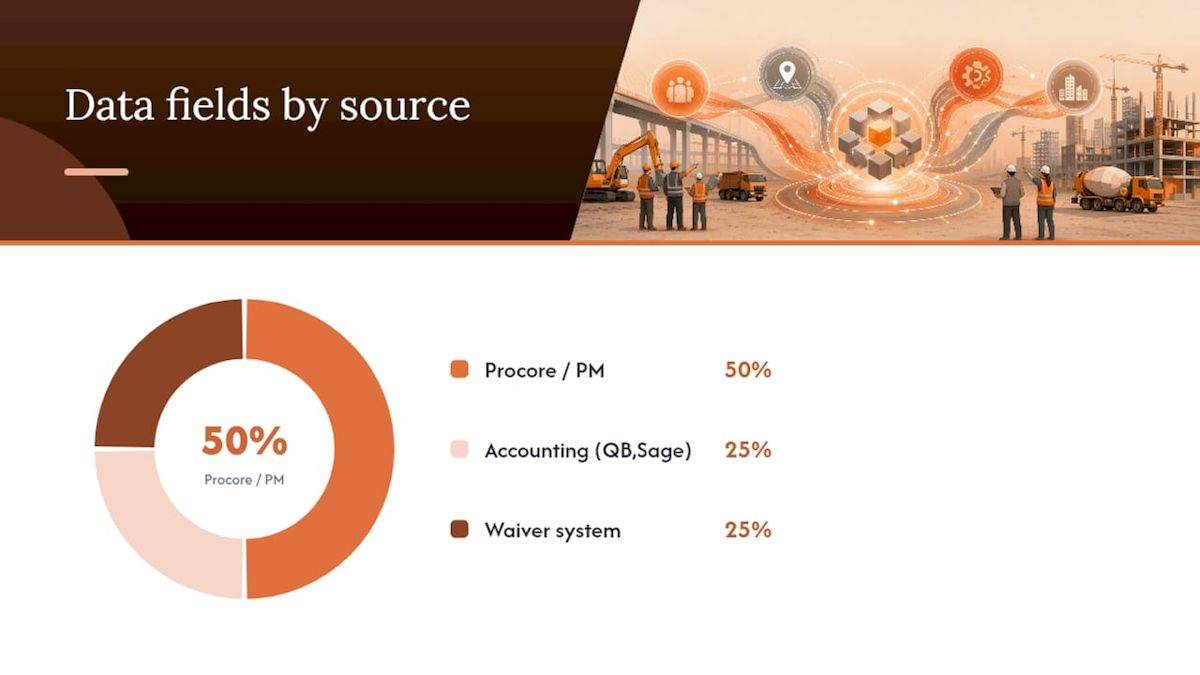
With Procore integration, the sequence runs like this: a pay app is approved in Procore, which pushes the payable data to your waiver system, which generates the correct conditional waiver and sends it to the subcontractor. Once signed, the waiver uploads back to Procore as a project document and releases the hold in QuickBooks.
Key integration considerations:
- Set API sync cadence to match your billing cycle (daily is usually sufficient; real-time for high-volume portfolios)
- Build duplicate detection on Payable ID to prevent double-sending
- Define error-handling rules: if a sync fails, the hold stays active until manual override
Pro Tip: Require dual authorization for any manual payment override that bypasses a waiver hold. Log every override with the authorizer’s name, timestamp, and reason. That log becomes your first line of defense in a dispute.
How does bulk waiver generation work across many subcontractors?
Automation ties pay-app approval directly to waiver generation, eliminating the manual follow-up cycle that consumes PM time at every billing period. The sequence:
- Pay app approved in your PM system
- System selects the correct state template for that project’s jurisdiction
- Auto-calculates the payment amount, balance to date, and through date
- Bulk-generates waiver requests for all subcontractors in that pay period
- Sends each sub a signing link with a pre-populated form
For CSV imports, your file needs these columns at minimum: ProjectID, VendorName, VendorEmail, PayableID, InvoiceAmount, ThroughDate, WaiverType, State.
Before accepting any returned waiver, run this validation checklist:
- Amount on waiver matches the approved payable amount
- Through date matches the pay period
- Signer name matches the authorized signatory on file
- Correct waiver type for the payment stage
- State statutory language is present and unaltered
Waiverpilotpro’s auto-calculated balances and multi-subcontractor support handle complex payables where a single pay app covers a prime sub and multiple suppliers, packaging all required waivers under one payable ID.
Pro Tip: Set a three-reminder escalation: Day 1 auto-email, Day 3 auto-SMS, Day 5 PM personal outreach. After Day 5, trigger a payment hold notification. That cadence converts most outstanding waivers without burning out your project managers.
What does a solid signing and approval workflow look like?
Signing authority is where disputes start. Before any waiver is accepted, confirm the signer is legally authorized to release lien rights for that entity. A signature from an unauthorized employee is not a valid waiver.
The approval sequence:
- Waiver request sent with pre-populated form
- Automated reminders at defined intervals
- Signer completes form; system validates required fields
- Payment hold remains active until validation passes
- Approved conditional waiver releases payment
- After funds clear, unconditional waiver request is triggered automatically
Signing checklist for every waiver:
- Correct legal entity name (not a DBA or nickname)
- Correct project address and project name
- Through date matches the pay period exactly
- Payment amount matches the approved payable
- Exception language preserved if the sub has outstanding claims
For subcontractors with limited technology access, the JobTread integration supports login-free signing via SMS link, removing the account-creation barrier that causes delays in the field.
Where notarization is required, embed it in the same signing session using remote online notarization so subs don’t need a separate appointment.
Pro Tip: Keep a paper fallback process for subs who genuinely cannot use digital tools: mail the pre-filled form, have them sign and return, then scan and index it into the registry with the same naming convention as digital waivers.
How do you reconcile waivers to payments and maintain an audit trail?
Treat waiver tracking as a front-end control, not a back-end cleanup. Reconciliation happens before payment releases, not after.
AP reconciliation checklist:
- Match signed waiver to the correct Payable ID in the registry
- Confirm waiver amount equals the cleared payment amount
- Confirm through date covers the full pay period
- Verify ACH or check clearance date
- Trigger unconditional waiver request immediately after clearance
Your audit trail needs these fields for every waiver record:
| Audit Field | Purpose |
|---|---|
| Waiver ID | Unique identifier for retrieval |
| Timestamp: Requested | When the waiver request was sent |
| Timestamp: Received | When the signed waiver was returned |
| Signer Identity | Name, title, and authorization basis |
| IP / Device Stamp | Electronic signing verification |
| Payable ID | Links waiver to the specific payment |
| Payment Clearance Evidence | ACH confirmation or check number |
| Override Notes | Any manual hold bypass with authorizer |
Retain waiver records for the full statute-of-limitations window in each project’s state, which ranges from two to ten years depending on jurisdiction. Store them so they can be retrieved within minutes for draw packages or dispute responses.
Pro Tip: Run a monthly exception report showing every waiver that is more than five days past its requested date. That report surfaces chronic non-compliers before closeout, when leverage is highest.
How do you manage waiver tracking across dozens of concurrent projects?
At portfolio scale, individual project tracking breaks down. You need a dashboard that shows the full picture in one view.
Dashboard elements that matter:
- Portfolio collection rate: Percentage of expected waivers received this period
- Aging buckets: Waivers outstanding 1–7 days, 8–14 days, and 15+ days
- Projects at risk: Jobs with holds active and payment dates approaching
- Subcontractor compliance ranking: Which subs consistently deliver on time vs. chronically late
- Hold count: Number of payments currently blocked pending waiver receipt
Operational practices that keep the portfolio manageable:
- Maintain a vendor master record keyed by tax ID and authorized signer to eliminate validation errors across projects
- Tag every registry record by project, tier, state, and billing cycle for instant filtering
- Share signer contact records across projects so a sub’s information updates everywhere at once
- Use recurring pay period templates to pre-populate the next cycle’s waiver requests
KPIs to track monthly: collection rate, average days to receipt, holds triggered, overrides authorized, and closeout delay days attributable to missing waivers.
Pro Tip: Score each subcontractor’s historical compliance and use that score to decide payment cadence. A sub with a poor compliance record should be required to submit waivers before payment is even scheduled, not after.
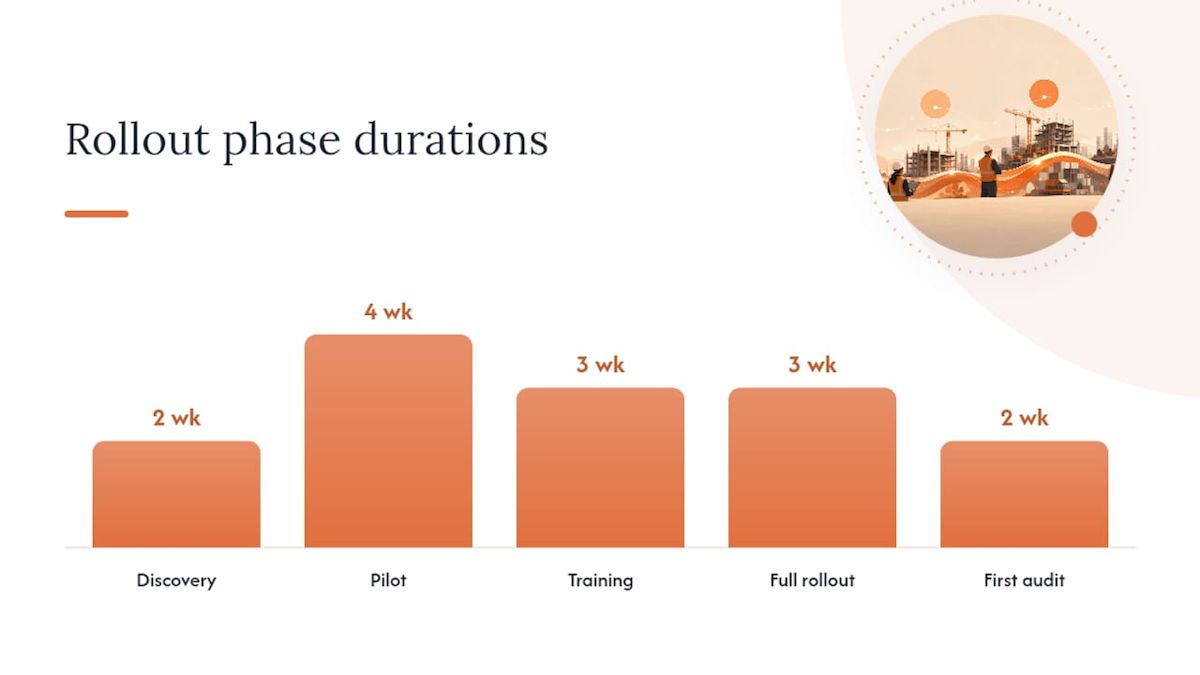
How do you roll out this system without disrupting month-end close?
A phased rollout protects your billing cycle while you build confidence in the new workflow.
Weeks 1–4: Discovery and pilot setup
- Select two or three high-value active projects for the pilot
- Import the subcontractor roster and contract data into the registry
- Map integrations with your PM and accounting systems
- Configure state templates for each pilot project’s jurisdiction
- Run one complete test pay cycle with holds active but payments released manually
Weeks 5–8: Live pilot
- Go live on pilot projects with full automation and holds enforced
- Track pilot metrics: reduction in PM follow-up time, days to collect waivers, number of holds triggered, number of overrides
- Conduct short role-based training sessions for PMs, AP staff, and key subcontractors
- Distribute quick-reference cards covering the signing checklist and escalation steps
Weeks 9–12: Full rollout
- Expand to all active projects after two successful billing cycles on the pilot
- Run the first portfolio-level compliance audit
- Establish the monthly exception report cadence
| Phase | Weeks | Key Milestone |
|---|---|---|
| Discovery | 1–2 | Registry built, integrations mapped |
| Pilot | 3–6 | Two billing cycles completed, holds active |
| Training | 5–7 | All roles trained, reference cards distributed |
| Full rollout | 8–10 | All projects live |
| First audit | 11–12 | Exception report reviewed, adjustments made |
Pro Tip: Start with your highest-contract-value projects. The financial exposure there is greatest, so the ROI on getting the workflow right is immediate and measurable.
How do you handle waiver disputes across multiple projects?
Disputes usually fall into three categories: amount disagreements, through-date conflicts, and signer authority challenges. Each has a clear resolution path.
For amount disagreements, pull the signed waiver, the approved pay app, and the ACH confirmation simultaneously. If the amounts don’t match, the waiver is invalid and a corrected one is required before payment releases. Document the discrepancy in the registry’s notes field and log the resolution date.
Through-date conflicts arise when a sub signs a waiver covering a shorter period than the pay app requires. The fix is a corrected waiver, not a workaround. Never accept a waiver with a through date that doesn’t cover the full pay period.
Signer authority challenges are the most serious. If a sub claims the person who signed lacked authority, you need the authorization documentation you collected at onboarding. This is why maintaining a vendor master with authorized signer records is not optional at portfolio scale.
Build a dispute log in your registry with fields for dispute type, date opened, resolution action, and date closed. That log protects you in lien proceedings and speeds up future draw package reviews.
How do you train staff and subcontractors on waiver procedures?
Training works best when it’s role-specific and short. A PM doesn’t need to understand the accounting hold logic; an AP clerk doesn’t need to know how to read a pay app. Keep sessions under 30 minutes and focus on the tasks each role actually performs.
For PMs: cover the escalation cadence, how to read the dashboard, and when to escalate a hold to AP leadership.
For AP staff: cover the reconciliation checklist, how to log overrides, and how to retrieve waivers for draw packages.
For subcontractors: a one-page reference card covering how to receive a signing link, what fields to check before signing, and who to call with questions. Make it available in both English and Spanish for crews where that matters.
Run a refresher at the start of each new project season and whenever a state updates its statutory forms. A step-by-step signing guide reduces errors at the sub level without requiring a live training session.
What security and data privacy practices protect your waiver records?
Lien waivers contain sensitive financial data: payment amounts, contract values, tax IDs, and signer identities. Treat them with the same care as payroll records.
Access controls should follow a least-privilege model: PMs see their own projects, AP sees payment data, and only administrators can delete or override records. Every access event should be logged with a timestamp and user ID.
For document storage, use encrypted cloud storage with version history enabled. Never store signed waivers in a shared drive folder with open permissions. Ensure your waiver platform uses TLS encryption in transit and AES-256 at rest.
For e-signature records, retain the full audit package: the signed document, the IP stamp, the timestamp, and the signer’s email confirmation. That package is what courts and title companies look for when a lien is disputed.
How do you keep your waiver process current as regulations change?
State lien laws change. California updated its statutory waiver forms in 2012 and those forms remain mandatory; other states have amended notice and waiver requirements more recently. A process that worked last year may produce void waivers this year.
Build a quarterly compliance review into your calendar. Each review should cover three things: confirm your state templates match current statutory requirements, verify your integration field mappings still align with your PM and accounting software versions, and check whether any projects have moved into a new jurisdiction.
Subscribe to construction law update services or assign a team member to monitor state legislature activity for the states where you work most. When a statutory form changes, update your template library immediately, version-stamp the new form, and notify all active project teams.
What most teams get wrong about waiver tracking at scale
Most contractors treat waiver tracking as a paperwork problem. It’s actually a cash flow control problem. The moment you reframe it that way, the priority shifts.
A missing waiver isn’t just an administrative gap. It’s an open lien right that a subcontractor or supplier can exercise against your project, your client’s property, or your bonding capacity.
The teams that get this right share one habit: they enforce the hold before the payment, not after. Automated holds are not punitive; they’re protective. Subcontractors who understand the system actually prefer it because it creates a predictable, documented payment process they can rely on.
The other thing most teams underestimate is the value of historical compliance data. After two or three billing cycles of tracking, you know exactly which subcontractors are reliable and which ones require extra follow-up. That data changes how you structure payment terms on the next contract.
Waiverpilotpro covers every component of this workflow
If you’re ready to put this system into practice, Waiverpilotpro gives you a direct path from manual waiver chaos to a fully tracked, integrated workflow, without the complexity of enterprise software.
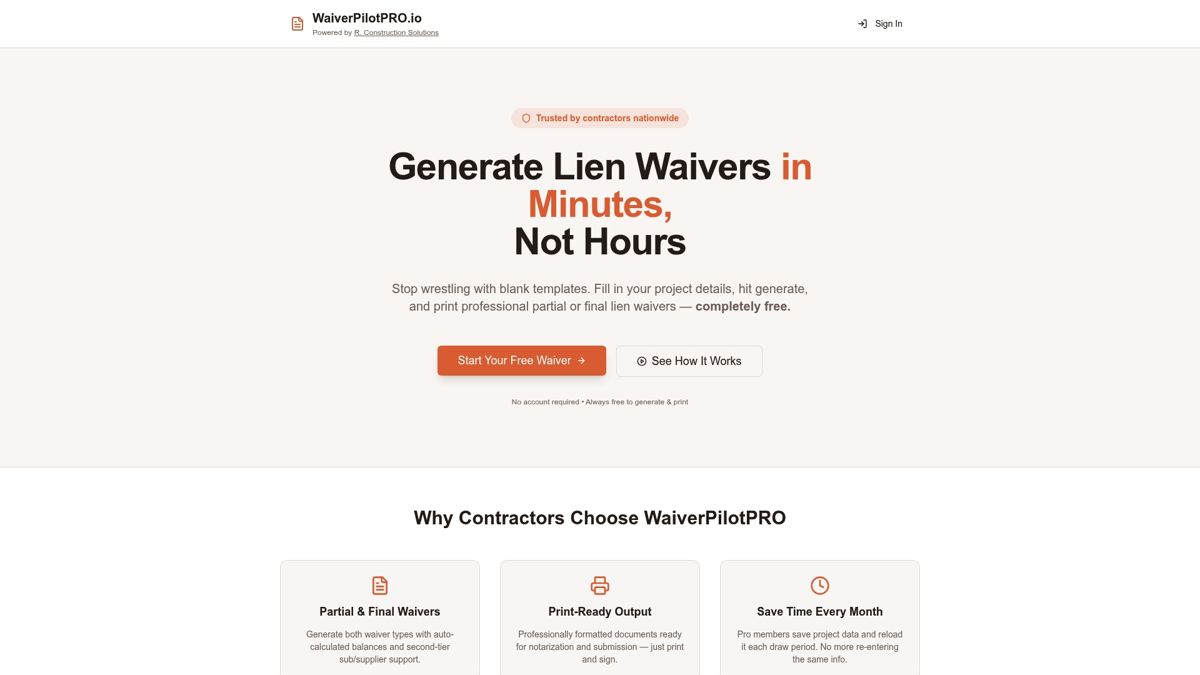
The free lien waiver generator lets you generate conditional and final waivers immediately, with no account required. For multi-project portfolios, the Pro tier adds project saving, AI-powered contract field auto-fill, bulk generation, and multi-subcontractor packaging. Integrations with Procore, QuickBooks, Buildertrend, JobTread, and Sage connect your waiver workflow directly to the systems your team already uses. State-specific templates cover all 50 states, and every generated document is notarization-ready.
To get started: generate your first waiver free, map one active project, enable one integration, and run a single billing cycle. That pilot gives you the data to justify the full rollout. Visit Waiverpilotpro to begin.
Useful sources and further reading
- Free Lien Waiver Generator for Contractors | Waiverpilotpro — generate conditional and final waivers at no cost; the fastest way to test the workflow on a single project
- Conditional vs. Unconditional Lien Waiver: What’s the Difference? | Waiverpilotpro — plain-English guide to matching waiver type to payment event
- Lien Waivers for Procore | Waiverpilotpro — integration documentation for the two-way Procore sync
- Free Construction Forms & Lien Waiver Templates | Waiverpilotpro — downloadable PDF and Word templates for offline use
- Construction Lien Waiver Automation Guide | US Tech Automations — detailed walkthrough of automation logic, holds, and compliance dashboards